0%

The 9 Best AI Search Visibility Tools In 2025

Let’s be honest: The way people search for things online has completely changed.

It’s not just Google anymore. These days, your customers are asking ChatGPT, scrolling through Perplexity, and using voice assistants.

And they rely on these AI summaries instead of reading full search results.

So what does that mean for your business?

It means that even if your website is technically live, you might still be invisible where it matters most. That’s because if these AI tools aren’t mentioning you, recommending you, or pulling your content into answers, you’re getting skipped.

That’s where AI search visibility tools come in.

Think of them as your personal radar. They tell you:

  • Where and when your business shows up in AI-generated results
  • What people are actually asking about your industry or service
  • And how you can improve your chances of being mentioned next time

And the best part?

You don’t have to be a tech expert to use them.

In this guide, I will walk you through the 9 of the best AI search visibility tools on the market. These tools are affordable, beginner-friendly, and made for small business owners like you.

You’ll learn:

  • What each tool actually does
  • How it can help your business get noticed
  • And how to pick the one that fits your needs, goals, and budget

If you want your business to show up in the places people are actually looking, this guide is your starting point.

Let’s dive in.

Key Takeaways

  • AI search tools like ChatGPT and Perplexity are replacing traditional search and your business needs to show up there.
  • AI visibility tools help you track mentions, keywords, and your competitors in these new platforms.
  • You don’t need SEO expertise. Most of these tools are built for beginners and small business owners.
  • Local businesses can benefit from tools like Writesonic GEO Tools to boost nearby visibility.
  • Tools like Ahrefs and Profound give deeper insights for businesses ready to compete at a higher level.
  • Start with one tool based on your goals like content improvement, keyword tracking, or local search.
  • Regular monitoring can help you react fast to drops in visibility or trending search terms.
  • AI visibility is the future of search. Start small and build your presence steadily.

The top-rated AI search visibility tools on the market

1. Ahrefs AI Search Monitoring
Ahrefs is already a well-known name in the world of SEO. But now, it’s keeping up with the future of search by helping you monitor your AI visibility too.

With its new AI Search Monitoring features, Ahrefs can show you:

  • Where your website appears in AI-powered search results (like Google AI Overviews, ChatGPT, or Perplexity)
  • Which keywords and questions are helping people find your business
  • How your site stacks up against competitors when it comes to AI mentions and citations

It’s like having a digital detective that’s constantly watching how AI search engines are treating your business and telling what to fix, improve, or double down on.

Why is it good for you?

You don’t need to be a data nerd or a developer to get value from Ahrefs. The platform is designed to give you clean, clear reports, even if you’ve never done SEO before.

Here’s how it helps small business owners:

  • You can see how visible your business is across traditional and AI-powered search
  • You get easy-to-follow suggestions to get into Google AI Overviews and improve rankings (like which keywords to focus on or which pages need updates)
  • It helps you keep an eye on competitors and find opportunities they might be missing

Who should use it?

Ahrefs is great for:

  • Small business owners who want a complete picture of their search performance (AI + Google)
  • Marketers or content creators who want to stay ahead of the curve
  • Anyone who wants data that makes sense without feeling overwhelmed

How much does it cost?

Plans start at $99/month, and while that’s on the higher side for beginners, you get access to a powerful suite of tools. This is not just for AI monitoring, but keyword tracking, backlink analysis, and more.

Pros:

  • Covers both traditional SEO and AI search visibility
  • Easy-to-understand reports, no tech skills needed
  • Excellent for competitor tracking and keyword research
  • Constantly updated to match search trends
  • Trusted and reliable brand with a huge knowledge base

Cons:

  • Starting price might be high for some solo business owners or side hustlers
  • Some advanced features can feel overwhelming at first
  • Not AI-specific only and includes lots of general SEO tools you may not use right away

Bottom line: Ahrefs is one of the most powerful tools out there if you’re serious about getting seen across both search engines and AI platforms. If you’re ready to invest a bit in your business’s digital visibility, this tool is worth considering.

2. AthenaHQ

AthenaHQ

AthenaHQ helps you keep track of how your website is showing up across AI-powered search engines like Google’s AI Overviews and ChatGPT. It watches what kind of keywords people are using to find you and businesses like yours and shows where you stand.

Think of it as a smart assistant that tells you:

  • How visible your business is across AI platforms
  • What your customers are searching for
  • What tweaks you can make to show up more often

Why is it good for you?

If you’re not a fan of graphs, dashboards, or confusing SEO jargon, this is your go-to AI search visibility tool.

AthenaHQ turns all that complex data into simple reports. You’ll get helpful suggestions like:

Add this phrase to your About page, people in your area are searching for it.

It’s designed for small business owners and not tech pros. So, everything is made to be easy, visual, and actionable.

Who should use it?

AthenaHQ is great if:

  • You want to keep tabs on how your website is performing in AI search
  • You’d like keyword tips, but don’t want to spend hours analyzing dat
  • You just want honest, simple advice to improve your visibility

Whether you’re a local bakery, HVAC company, or solo service provider, AthenaHQ gives you the info you need minus the overwhelm.

How much does it cost?

Pricing starts at around $50/month, with flexible options depending on how many features you want to use.

Pros:

  • Super beginner-friendly, no SEO knowledge needed
  • Gives real keyword suggestions based on AI search trends
  • Tracks your performance across different AI tools, not just Google
  • Clear and easy-to-read reports

Cons:

  • Doesn’t go super deep if you want advanced competitor analysis
  • Might feel too basic if you’re already using high-level SEO tools

Bottom line: AthenaHQ is a solid choice for small business owners who want a clear picture of how they’re showing up in AI searches without needing to become an SEO expert.

3. Profound

Profound is like a watchdog for your website (and your competitors’). It scans both to find out what keywords are working, what’s trending in your industry, and what kind of content is getting noticed by AI search tools.

In simple terms:

  • It tells you what’s working for you
  • It shows you what’s working for your competitors
  • And it points out simple things you can do to show up more often in AI-generated results (like rank in results for ChatGPT, Gemini, and others)

Why is it good for you?

You don’t need to learn anything technical. Profound gives you practical suggestions like:

  • Add this topic to your blog, it’s trending right now in your niche.
  • Your competitor is ranking for this keyword, here’s how you can too.

It also helps you stay on top of shifting AI search trends, so you’re not left behind as platforms evolve.

Who should use it?

Profound is perfect for you if:

  • You want to know how your website is doing compared to others in your space
  • You want AI-friendly keyword suggestions based on real trends
  • You don’t want to mess with complicated dashboards or tools

It’s especially helpful for small businesses in competitive industries like salons, clinics, fitness studios, home services, etc.

How much does it cost?

Plans start at around $75/month, a reasonable investment if you want to keep improving your online visibility.

Pros:

  • Tracks your competitors and gives you ideas to beat them
  • Helps you follow AI-driven keyword and content trends
  • Super simple to use. No jargon, just suggestions
  • Updates regularly with fresh insights

Cons:

  • Might not be ideal for brand-new businesses with no content yet
  • Lacks some of the deep SEO features advanced users might want

Bottom line: Profound is a great pick if you’re looking to grow your visibility by learning from your competition without diving into the deep end of technical SEO.

4. Otterly.ai

Otterly AI

Otterly.ai quietly keeps an eye on how your website is performing in AI-powered search results, and lets you know when something changes.

Even better?

It compares your performance to your competitors, so you can see how you’re stacking up.

In simple terms:

  • It shows where your website is showing up (and where it’s not)
  • It spots if your visibility suddenly drops or improves
  • It suggests small tweaks you can make to stay ahead of the competition

You don’t need to dig through confusing reports as Otterly’s AI does the heavy lifting and just tells you what matters.

Why is it good for you?

Keeping up with rankings, visibility, and competition is exhausting if you’re trying to run a business. Otterly.ai simplifies it all:

  • No need to be techy
  • No need to interpret complicated charts

You get just helpful updates like:

  • Your rankings dipped this week, here’s what you can fix.
  • Your competitor added a new page that’s gaining traffic, you might want to do something similar.

Who should use it?

Otterly.ai is a great fit for business owners who:

  • Want to monitor their visibility without constantly logging into tools
  • Need a clear view of how their site is doing vs. competitors
  • Prefer tools that explain things simply, with no jargon

Whether you run a local service or an online store, Otterly helps you make smart choices based on what’s really happening.

How much does it cost?

Plans start at around $60/month, making it a solid mid-range option for small businesses that want AI-powered insights without getting overwhelmed.

Pros:

  • Sends alerts if your search visibility changes
  • Simple interface with clear explanations
  • Competitive tracking built-in
  • AI-powered suggestions you can act on right away

Cons:

  • Doesn’t offer deep content suggestions like some other tools
  • Might be overkill if you’re just starting out with zero website traffic

Bottom line: Otterly.ai is a great choice if you’re looking for a set-it-and-forget-it tool that quietly keeps an eye on your online visibility and tells you when something important happens.

5. Scrunch AI

Scrunch AI

Scrunch AI looks closely at everything on your website, from the keywords you use to the images you show. And it then tells you how to make it better so search engines like Google and AI platforms can find you more easily.

Think of it this way: Scrunch AI helps you speak the language your customers are using when they search online. It spots what’s missing or confusing and gives you simple advice to fix it.

Why is it good for you?

If you’re not a writer or a tech expert, Scrunch AI makes improving your website content easy and doable. Instead of overwhelming you with technical SEO jargon, it breaks everything down clearly, like a friendly coach saying:

  • Try adding these keywords to your page.
  • Your images need descriptive labels so Google knows what they are.
  • Here’s how to make your headlines catchier.

This way, you don’t just get more visitors, you get visitors who are actually interested in what you offer.

Who should use it?

Scrunch AI is perfect if you:

  • Want to improve your website content but don’t know where to start
  • Prefer simple and clear advice instead of complicated SEO tutorials
  • Are focused on making your site more attractive to both customers and search engines

Simply put, if you want your website to shine without needing a degree in SEO or hours of learning, Scrunch AI is a helpful sidekick.

How much does it cost?

Prices start at around $55/month, with different plans depending on how much help you want.

Pros:

  • Easy-to-understand content suggestions
  • Helps improve both text and images on your site
  • Perfect for beginners and non-tech-savvy users
  • Affordable pricing with flexible plans

Cons:

  • Mainly focused on content, doesn’t track rankings or competitors
  • Not for those wanting deep technical SEO insights

Bottom line: If your website content feels a little “meh” and you want to make it more appealing, both to people and search engines, Scrunch AI can be a game-changer.

6. Rankscale.ai

Rankscale

Rankscale.ai checks where your site shows up on search engines every single day and sends you alerts if anything important changes

For instance, if your visitors suddenly drop or your rankings slip, you’ll get alerts. This way, you can jump in quickly and fix any problems before they get worse.

Instead of guessing whether your website is doing well or not, Rankscale.ai gives you clear updates so you’re never in the dark.

Why is it good for you?

The online world changes fast, and losing your spot on search results can mean fewer customers finding you.

Rankscale.ai helps you stay on top by keeping you informed with easy-to-understand alerts.

No need to dig through confusing charts or reports as it gives you straightforward information that tells you when to take action.

It’s like having a friendly assistant who keeps track of your website’s health and gives you a heads-up whenever something needs your attention.

Who should use it?

Rankscale.ai is great for business owners who:

  • Want to check their website’s performance regularly without hassle
  • Prefer simple alerts instead of complicated reports full of tech talk
  • Need a quick way to spot problems and fix them fast

If you want to stay visible online but don’t have time to dive into detailed analytics, Rankscale.ai makes monitoring your site easy.

How much does it cost?

Plans start at just $40/month, making it a budget-friendly option to keep an eye on your rankings every day.

Pros:

  • Daily monitoring keeps you updated in real time
  • Simple alerts with no confusing data overload
  • Helps you react quickly to ranking changes
  • Affordable pricing

Cons:

  • Focuses mainly on monitoring and doesn’t provide deep SEO advice
  • May not be the best choice if you want all-in-one SEO features

Bottom line: If staying on top of your search rankings without the headache of complex reports is something you want, Rankscale.ai is a handy no-fuss tool.

7. Writesonic GEO Tool

Writesonic

Writesonic GEO Tool helps you understand how your business appears in search results depending on where people are searching from. If you want to attract customers in your neighborhood or city, this tool shows you exactly how your business looks to people in different locations.

Also, it helps you spot where you’re doing well and where you might need to improve your local presence.

Think of it as a way to check if your business is showing up on people’s phones or computers when they search nearby.

Why is it good for you?

This tool focuses on location, making it perfect if your customers mostly come from your local area.

Instead of guessing if people nearby can find you, Writesonic GEO Tools gives you clear insights into how your business ranks across different neighborhoods or cities.

With this information, you can make smart changes that attract more local visitors and customers.

Who should use it?

  • Small business owners who depend on customers close to them
  • Anyone who wants simple, location-based reports without getting lost in complicated data
  • Businesses looking to improve local search visibility for better foot traffic and local sales

If you want to be the go-to spot in your area, this tool is a great choice.

How much does it cost?

Plans start at about $70/month, making it an affordable way to boost your local online presence.

Pros:

  • Focused specifically on local search results
  • Helps attract nearby customers who are ready to buy
  • Easy-to-understand, location-based reports
  • Great for local businesses like shops, restaurants, and service providers

Cons:

  • Not ideal if you want to focus on national or global search visibility
  • Primarily centered on location data, so it may lack some broader SEO features

Bottom line: If local customers matter most to your business, Writesonic GEO Tools gives you the inside scoop on how to get noticed by people nearby.

8. Knowatoa

Knowatoa

Knowatoa helps you keep track of two important things:

  1. How your website is showing up in search results.
  2. How your competitors are doing.

It turns all that search data into easy-to-read reports. So even if SEO feels overwhelming, this tool breaks it down so it actually makes sense.

Why is it good for you?

Not every business owner has time (or interest) to become an SEO expert. And Knowatoa gets that.

It doesn’t try to impress you with fancy features you’ll never use. Instead, it focuses on what matters. For instance:

  • Are people finding your business online?
  • Who else is showing up when they search?
  • And what can you do to show up more often?

It gives you straightforward answers and practical tips to help you improve.

Who should use it?

  • Business owners who want to understand their online visibility without learning “SEO speak”
  • Anyone who prefers a clean, simple tool that gets right to the point
  • Business owners who want to quietly outsmart competitors without digging through a pile of data

How much does it cost?

Pricing starts at just $45/month, making it one of the more budget-friendly tools on this list.

Pros:

  • Clean, simple, and easy to use
  • No unnecessary features or fluff
  • Great competitor tracking alongside your own stats
  • Perfect for beginners who want clarity, not complexity

Cons:

  • Might not offer in-depth features for advanced users
  • Doesn’t include detailed content optimization or AI writing help

Bottom line: If you want a no-fuss tool that just tells you what’s working (and what’s not), Knowatoa is a solid pick.

9. Perplexity Pages Analytics

Perplexity Pages Analytics is like a health check-up for your website, but focused on how well your pages are performing in AI-powered search results.

It shows you:

  • Which of your web pages are getting noticed
  • Which keywords are bringing people in
  • Where there’s room to grow

On top of that, it gives you practical suggestions to help more visitors find your site. This includes things like updating specific content or adjusting keywords you’re already ranking for.

Why is it good for you?

It keeps things simple.

You won’t get lost in piles of charts or confusing SEO language. Everything is laid out in a simple way, so you can quickly understand what’s working and what to tweak.

You’ll also appreciate that it’s focused on actionable tips and not just stats.

Who should use it?

  • Small business owners who want to improve their website’s visibility but don’t want to spend hours figuring out what all the numbers mean
  • Anyone who wants quick, clear wins
  • People who prefer a straightforward tool that tells them what to do next

How much does it cost?

Pricing starts at just $50/month, making it a great value for the insights it provides.

Pros:

  • Easy to understand, even for non-tech users
  • Great suggestions on how to get more visitors
  • Clear breakdown of page-level performance
  • Good balance of simplicity and strategy

Cons:

  • Not as advanced for competitor tracking
  • Might not go deep into technical SEO details

Bottom line: If you’re looking for a tool that helps you figure out how to get more people to your website, Perplexity Pages Analytics is a strong choice.

Here’s a comparison of all the above AI search tracking tools

Tool Name Best For Starting Price Key Features Tech Skill Needed
Ahrefs AI Monitoring SEO + AI search tracking $99/month Competitor tracking, AI overview visibility Low–Medium
AthenaHQ Beginner-friendly AI keyword tracking $50/month Simple reports, AI keyword tips Low
Profound Competitor + trend insights $75/month AI-driven suggestions, industry trends Low
Otterly.ai Set-it-and-forget-it AI visibility $60/month Alerts, competitor comparisons Low
Scrunch AI Website content improvement $55/month Content & image tips, non-technical SEO Low
Rankscale.ai Daily search monitoring & alerts $40/month Instant notifications, ranking drops Very Low
Writesonic GEO Tools Local visibility & location insights $70/month Regional search tracking Low
Knowatoa Simplicity + competitor basics $45/month Clean reports, basic SEO tracking Very Low
Perplexity Pages Analytics Page-level AI visibility analysis $50/month Keyword performance, optimization suggestions Low

Conclusion

Staying visible in today’s AI-driven search world might sound complicated. But it doesn’t have to be.

The tools for AI visibility tracking we just walked through are built with real business owners in mind. They are for people like you who want to know:

  • Where is my website showing up?
  • What are people searching for?
  • How can I get more of the right eyes on my business?

Got questions or want help building a simple AI SEO plan for your business?

Reach out to us!

At Your Hustler Inc., we specialize in helping small businesses like yours get noticed by AI through clear, trustworthy content and smart strategies. We’ll help you grow your visibility and make your business shine on AI-powered platforms.

Let’s get your business in front of the people who are already looking for you.

FAQs about the best AI visibility tracking tools

What is an AI search visibility tool?

An AI search visibility tool helps you see how your website shows up in AI-powered search engines like Google’s AI Overviews or Perplexity. It tells you what people are searching for, where your site shows up, and how to improve your chances of being found.

Do I need to be tech-savvy to use these tools?

Not at all!

Most of these tools are built to be simple and easy to understand. They come with clear reports and tips you can follow without needing to know anything about coding or complicated SEO stuff.

How do I know which tool is right for me?

Start by asking what matters most to you.

  • Want to track local customers? Try Writesonic GEO Tools.
  • Want help with your website content? Scrunch AI might be better.
  • Want simple reports and no fluff? Knowatoa or AthenaHQ are great picks.

Are these tools expensive?

Most tools start between $40 to $100 per month, with different plans depending on your needs. It’s a small investment considering the potential return in visibility, traffic, and customers.

Will these tools help me get more customers?

They won’t bring customers overnight, but they show you exactly what to fix or improve so that more people can find you online. Over time, better visibility means more clicks, more calls, and more business.
Can I use more than one tool?

You can, but it’s best to start with just one so you don’t get overwhelmed. Once you’re comfortable, you can explore other tools to fill in gaps.

Do I still need to use Google Business Profile?

Yes!

It is super important to keep your Google Business Profile optimized and up-to-date, especially for local visibility.

AI search tools help you track visibility, but your GBP helps you show up in maps and local searches. Use both together for best results.

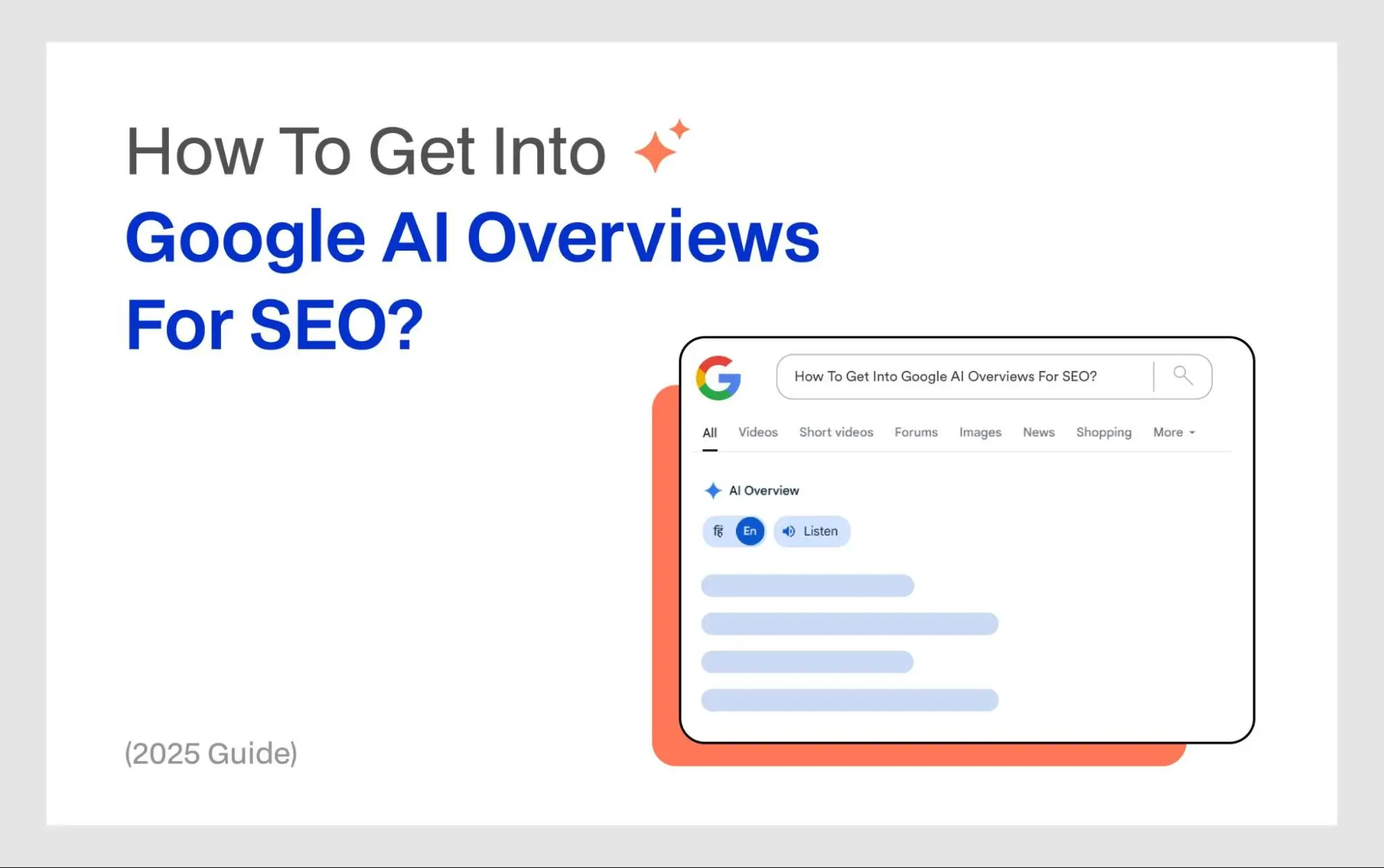
How To Get Featured In Google AI Overviews For SEO

You might have noticed Google giving away the answer to your query before you even click a link.

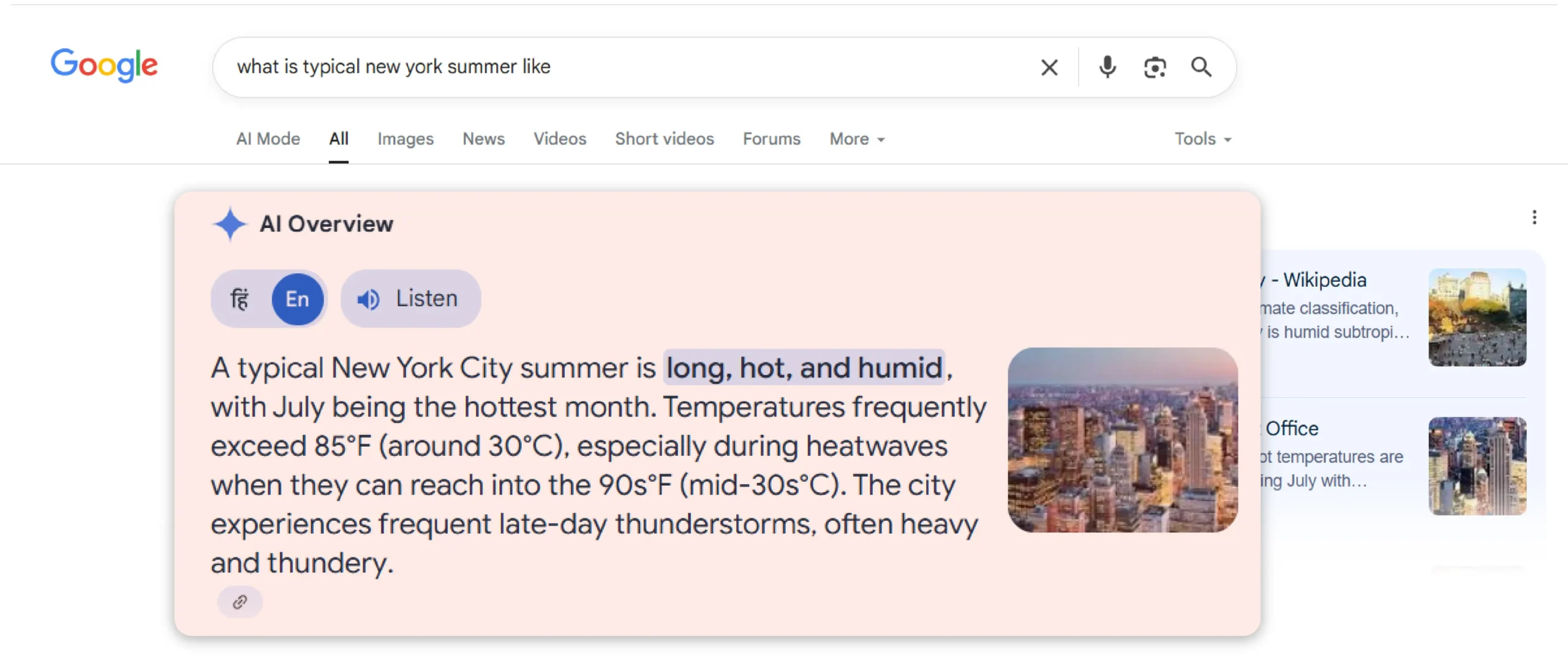
That big box at the top of search results is Google’s new AI Overview. And for small businesses like yours, it is a big deal.

Why?

If your business shows up there, you’re not just on page one, you’re the first thing your potential customers see.

In fact, for local shops, service professionals, coaches, and online stores this is quite powerful. After all it gets you more eyeballs, more trust, and more clicks before your competitors even get a shot.

The best part?

You don’t need to know code or chase SEO trends. Just follow a few simple steps and let Google do the rest.

This is exactly what I am going to talk about in this blog. You’ll learn:

  • What AI Overviews are
  • Why they matter for small businesses
  • And exactly how to get your content featured there

So, let’s get started front and center.

Key Takeaways

  • Google AI Overviews show quick answers before regular search results.
  • You can’t pay your way in, but you can optimize to improve your chances.
  • Create content that answers real customer questions clearly and simply.
  • Your website must be fast, mobile-friendly, and easy to use.
  • Use real words, not jargon. Speak what your customers search for.
  • Add original photos, videos, and how-to guides to boost trust.
  • Include a clear FAQ section on service and product pages.
  • Make sure Google can see and index your content (no “noindex” tags).
  • Keep your business information (NAP) consistent across all platforms.
  • Add reviews, testimonials, and certifications to build authority.
  • Update your site regularly. Fresh content = trust + visibility.
  • Use tools like Google Search Console or Semrush to track your progress.
  • Even small local businesses can get featured, it’s all about being genuinely helpful.

What Is Google AI Overview?

If you type a question like “best pizza place near me” into Google, it gives you a quick answer right at the top before you even click on anything.

That’s what’s called a Google AI Overview.

It is like a super answer box that shows up above all the regular websites. And to do so, it pulls together a bunch of useful information from different websites, adds quick summaries, shows business names, reviews, and sometimes even pictures.

The best part: You get all the information you need in one helpful box.

So how does this affect your business?

Let’s say someone types in queries like:

  • Who’s the best plumber in my area?
  • How much does lawn care cost in Kansas?
  • What’s the best bakery in town?

Now, Google might show an AI Overview right at the top before any websites or even ads in some cases. And if your business is mentioned in that box, you can get:

  • More calls
  • More clicks
  • More customers

That’s why this new feature is such a big deal for business owners.

Why is it so important to get into AI Overviews?

Most business owners out there don’t care about the latest tech buzzwords. All they want is more customers, more phone calls, and more people walking through your door.

And that makes sense.

But here’s the thing: Google is changing, and so is the way people search.

Instead of scrolling through websites or clicking on ads, people now get one quick answer at the top of the page.

That means if your business is not mentioned there, you’re not even in the race.

Here’s what could happen if you’re not in the AI Overview:

  • You might still show up in search, but way down the page
  • Your competitor could be featured at the top where you’re invisible
  • You lose clicks, calls, and customers without even realizing it

Now let’s flip that…

Here’s what could happen if you’re featured in AI Overviews:

  • Your business is seen before ads or big company websites
  • You get more trust right away because Google picked you
  • You don’t have to spend a dime on ads to get visibility
  • People click, call, or visit your shop without even going to your website

This is especially important if you:

  • Own a local service business (plumbing, roofing, cleaning, etc.)
  • Run a brick-and-mortar store (like a bakery, boutique, or auto shop)
  • Serve a suburb, small town, or rural area where word of mouth is huge

You see, Google’s AI doesn’t care how big your business is. But it does care about who’s most helpful and trustworthy.

This means, notwithstanding your business size, you can compete with the bigger players if you get AI search optimization right with information that’s clear, useful, and easy to understand.

How to get into Google AI Overviews?

For starters, let me tell you that there’s no way you can force your way into Google AI Overviews. That’s because there’s no ad or marketing campaign that lets you get your website featured.

But you can increase your chances by making a few smart moves on your website.

I’ve put together a simple, no-fluff, no-tech checklist that you can actually use to get your content stand out to Google’s AI.

So, let’s dive into it.

Step 1: Write helpful content that answers real questions

Think about the questions your customers ask all the time because that’s your best opportunity to create helpful content.

You see, the biggest mistake people make is trying to rank for generic keywords. This worked for old SEO, but Google’s AI has become smarter and it wants genuine trustworthy information.

So, you should answer something specific like:

  • How much does roof repair cost in Ohio?
  • Can I fix a leaky faucet myself?
  • What should I do if my AC stops working at night?

Write a blog post that answers such questions clearly and simply without jargon and just be genuinely helpful. This is exactly the type of content AI Overviews love to show.

Step 2: Make sure your page loads fast and works on mobile

Over 60 percent of all searches on Google come from phones. Google knows this and its AI ranks websites that work well on phones.

Here’s what I suggest you ensure:

  • Your website loads in under 3 seconds
  • It looks good and is easy to read on a phone
  • It has no giant images or annoying pop-ups

It is simple: If your website is slow or broken on mobile, Google’s AI will see that as a bad experience and will likely skip over your content.

Pro tip: You can use tools like Google PageSpeed Insights to check your site’s speed and mobile performance.

Step 3: Use simple keywords that people actually search

You should absolutely avoid technical terms or marketing talk like “Professional residential HVAC optimization solutions.”

After all, people don’t search that way. Instead, they search for:

  • AC repair near me
  • cheap plumber in Dallas
  • electrician open Sunday

Meaning you should use the exact phrases your customers might say out loud or type into Google. You can also use my keyword research tips to be featured in AI answers.

AI Overviews scan content that closely matches real-world questions and keywords. So, speak your customer’s language and not the industry’s.

Step 4: Add real photos, videos, or how-tos

If there’s one thing that gets you more trust and more visibility, it is original visuals.

And that’s why I suggest you add:

  • Real photos of your work, team, or location
  • Short videos explaining or showing a service
  • Before-and-after images of projects
  • Step-by-step guides or how-tos

These help Google understand your content better and might even get pulled directly into AI Overviews. Plus, customers love seeing proof that you’re the real deal.

Pro tip: Avoid generic stock photos and add real ones even if they don’t look or feel the best. That’s because authentic visuals beat polished ones every time.

Step 5: Have clear FAQs on your pages

Every service or product page on your website should have a few common questions answered, just like you would in a customer call.

You can add questions like:

  • Do you offer same-day service?
  • What areas do you serve?
  • Is there a warranty?
  • How do I book an appointment?

You can use your actual customer questions. This not only helps users, but also gives Google structured information that it can use in AI Overview answers.

Bonus: FAQs make your page more helpful without feeling salesy.

Step 6: Don’t hide your content from Google

Sometimes websites accidentally block Google from indexing their pages without even realizing it. And it prevents Google from showing their pages in search results or AI Overviews.

So what can you do to prevent this?

Here are some quick action steps you can take:

  • Ask your web person or developer: “Can you check that my pages are indexable and allow snippets/previews for AI?”
  • Make sure there are no “noindex” tags or settings that block crawlers
  • Use Google Search Console to confirm your page is visible

If Google can’t access your content, there’s no chance it will appear in AI Overviews even if it’s super helpful.

Step 7: Make sure your information matches everywhere

Google’s AI looks for consistency across the web. Meaning if your contact info is even slightly off somewhere, it can cause confusion.

So, do make sure that your Name, Address, and Phone number (NAP) match exactly across:

  • Your website
  • Google Business Profile
  • Facebook, Yelp, directories, etc.

Pro tip: Even small changes like “Street” vs. “St.” can throw things off. Use the same format everywhere so AI tools trust that you’re a real established business.

Step 8: Add trust signals (like reviews or testimonials)

AI wants to show credible and trustworthy sources, and your online reputation helps a great deal here.

You can include things like:

  • Customer reviews or star ratings
  • Short testimonials with names
  • Certifications or licenses
  • Media mentions or press
  • Any local awards or recognitions

Just a few honest reviews on your site can go a long way. Google’s AI notices when others are saying good things about you and it uses that to decide whether you should be featured in AI Overviews.

Step 9: Keep your website fresh and active

A stale website is a red flag to Google’s AI. It assumes you’re not active, or worse, out of business.

Here’s how to stay fresh (without blogging every day):

  • Add a new photo of a recent project
  • Post a short tip or seasonal reminder
  • Update your hours, pricing, or services
  • Add at least one new blog or FAQ every month
  • Refresh your homepage with recent reviews

Changes or updates, no matter how small, show Google that your business is alive and helpful. This builds trust and increases your chances of being pulled into AI Overviews.

Quick recap: Here’s your 9 step checklist to get into Google AI Overviews

Step What to Do Why It Helps
1 Write helpful pages AI picks up clear, useful answers
2 Mobile + fast AI favors phone-friendly websites
3 Use simple words Google understands what you offer
4 Add real photos/videos Builds trust + adds helpful visuals
5 Include FAQs AI loves questions and answers
6 Let Google index you Don’t accidentally block yourself
7 Match your info Consistency = trust
8 Show off reviews Social proof matters
9 Stay fresh AI prefers active businesses

Real-life examples of businesses that show up AI overviews

While we don’t always know exactly which websites Google features, there are some businesses that do feature prominently on AI Overviews. Here are two such examples to help you picture how this can work for a small business like yours.

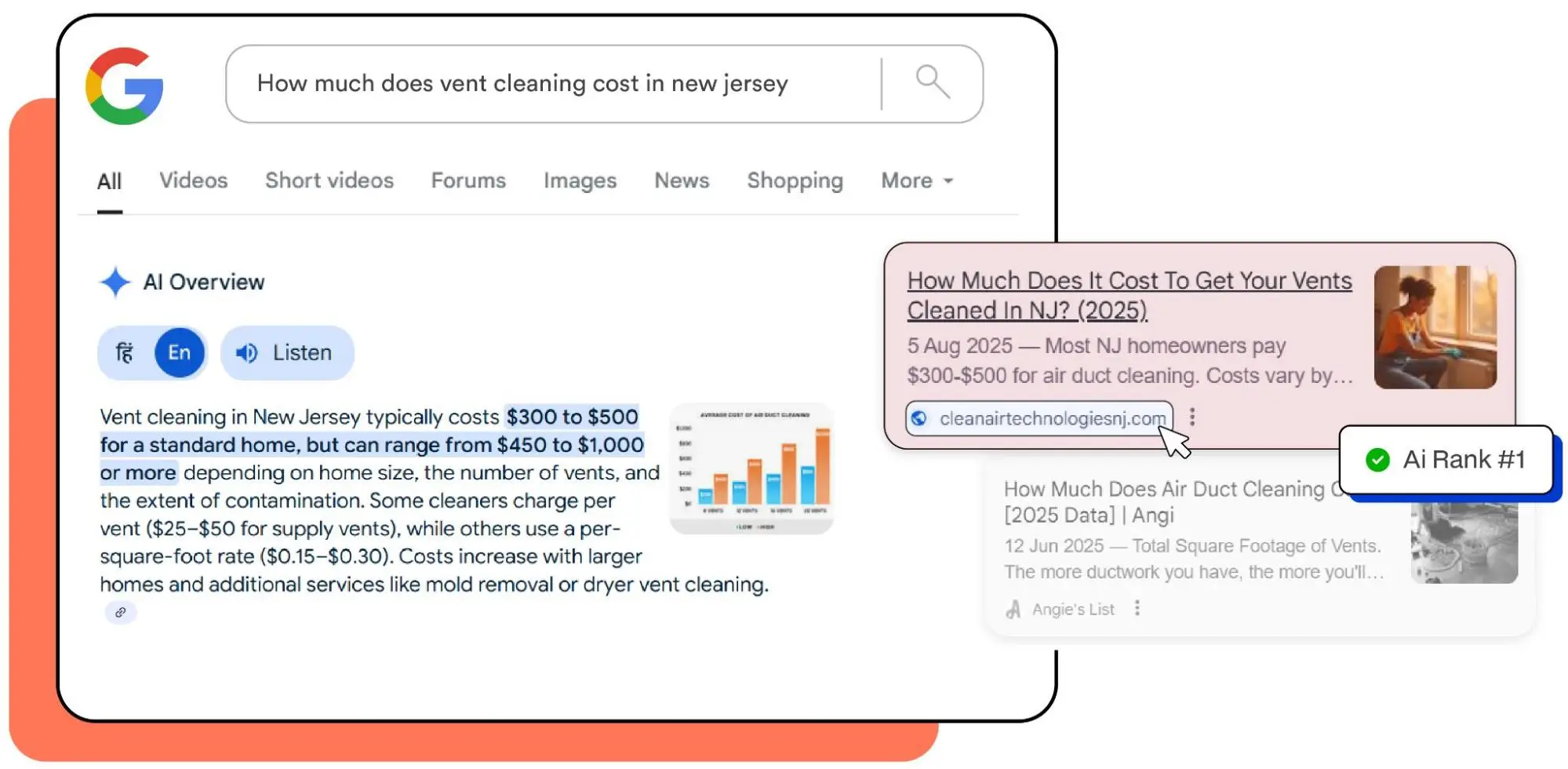
Example 1: Clean Air Technologies

Clean Air Technologies is a local business offering HVAC maintenance and air duct cleaning across New Jersey.

What we helped them:

  • Publish clear and helpful blog posts.
  • Answer common questions simply, using everyday language and local context.
  • Ensure the site was fast, mobile-friendly, and optimized for local search.
  • Add trust signals like before/after photos, reviews, and real service examples.
  • Make sure all business info (Google Business Profile, website, listings) matches perfectly.

Why it worked:

Google’s AI pulled their blogs directly into the Overview section because they are relevant, useful, and trustworthy.

AI Search Image-5

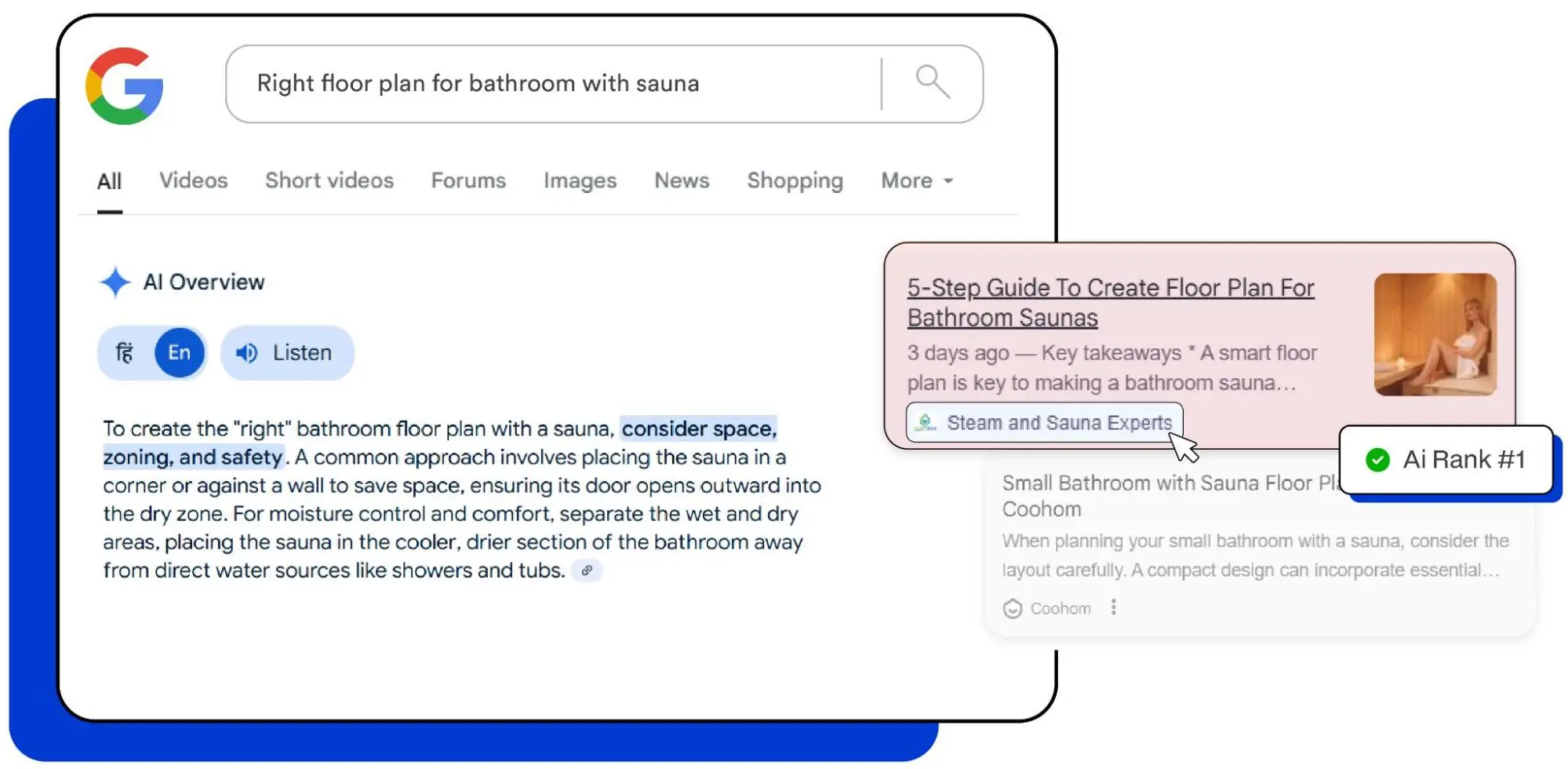
Example 2: Steam and Sauna Experts

Steam & Sauna Experts is an e-commerce store that sells home sauna systems, steam room accessories, and wellness products across the country.

What we helped them:

  • Write helpful blog posts, answering most asked questions in detail. 
  • Provide common layouts, tips, and product suggestions.
  • Add photos and diagrams to help users visualize the space.
  • Tag their products and link them within the content naturally.
  • Stay consistent with branding and business information across their website, product pages, and Google profile.

Why it worked:

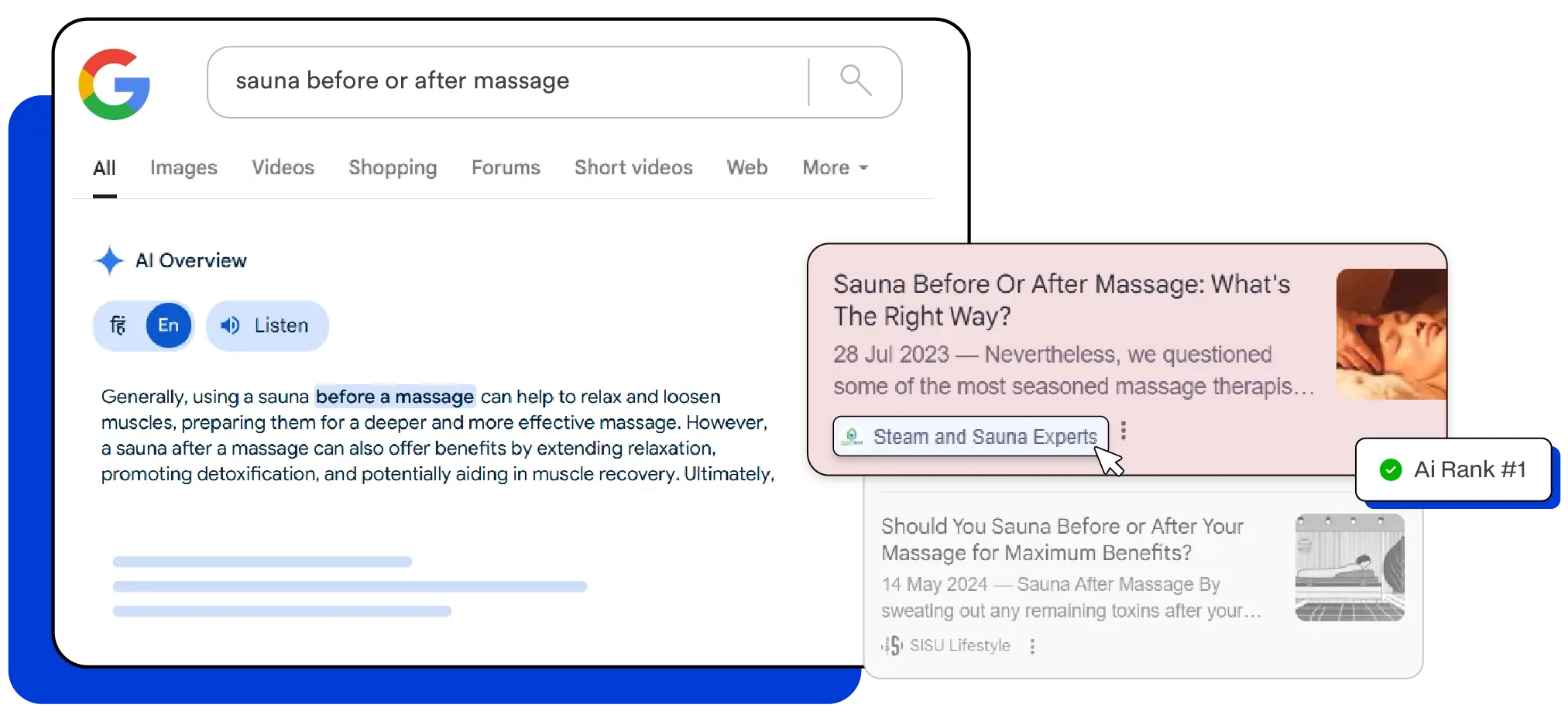
Google’s AI liked the specific and helpful nature of their content. Plus their blogs aligned perfectly with what a real customer might search.

AI Search Image-5

What’s your takeaway?

You don’t need to be big or flashy to get noticed by Google AI Overviews. All you’ve got to do is:

  • Write a helpful page answering a real local question,
  • Use customer-focused language and images,
  • Keep your info accurate everywhere, and
  • Make your business sound trustworthy,

Common mistakes to avoid when optimizing for Google AI Overviews

Now that you know what helps you get into Google’s AI Overviews, let’s talk about what can actually hurt your chances and how to avoid these simple but common mistakes.

Mistake #1: Writing just for Google and not for people

Some people stuff their website with keywords like:

“Best affordable HVAC repair expert near me in Texas fast service cheap top-rated.”

That’s confusing and Google sees that as spammy.

Here’s what you should do:

Write like you’re explaining things to a neighbor. Use natural phrases like:

“We offer quick and affordable HVAC repair in Tyler, TX.”

Mistake #2: Copying content from other websites

If your page sounds exactly like what’s already online, Google’s AI skips it. That’s because it wants fresh and real content.

Here’s what you should do:

Use your own words. Talk about how you do things, what makes your service different, or real questions your customers ask.

Mistake #3: Ignoring your Google Business Profile

If your GBP isn’t complete, verified, or up to date, Google’s AI may not trust your business info at all.

Here’s what you should do:

Make sure you follow a standard GBP optimization checklist and your Google profile has your correct name, phone number, hours, and lots of real reviews and photos.

Mistake #4: Not showing where you’re located

If your website doesn’t clearly say what towns or cities you serve, you might be invisible in local AI results.

Here’s what you should do:

Add your location in plain text like:

Serving homeowners in El Dorado County, CA Or We fix roofs all across southern Illinois.

Mistake #5: Never updating your website

Old content tells Google and AI that your business might not be active even if you are.

Here’s what you should do:

Post an update now and then. Add a seasonal service. Change a headline. Even small updates help.

Mistake #6: Hiding your content from Google

Some websites block search engines without realizing it, especially if they were built using DIY tools.

Here’s what you should do:

Ask your website builder or SEO person to double-check:

  • The page isn’t marked “noindex”
  • You allow Google to show snippets (important for AI Overviews)

This barely takes about 5 minutes and makes a big difference.

Quick recap: Here are some mistakes you should avoid

Mistake What to Do Instead
Keyword stuffing Use natural, clear sentences
Copy-paste content Write in your own words
Ignoring GBP Keep it updated and verified
Vague location Say exactly where you serve
Inconsistent details Match info across all platforms
No site updates Match info across all platforms
No site updates Make small changes regularly
Blocking Google Let Google “see” and use your content

How to know if you’re showing up in Google AI Overviews?

Google doesn’t send you a message or show a report saying you’re now featured in AI Overviews.

So how do you find out?

You have to do a little detective work.

Don’t worry, it’s not hard, and you don’t need to be an SEO professional to do this.

Here are three things you can do:

Method #1: Search like a real customer would

You can use Google the same way your customers do.

Try searches around your product or service, like:

  • Best electrician in [your town]
  • Affordable plumber near [your zip code]
  • How much does AC repair cost in [your city]
  • [Your service] open now near me

Scroll down and look for AI-generated answers (they usually show at the top or near the top of the page).

Now, if your business is mentioned, bingo, you’re in the AI Overview. And if your website, blog post, or Google Business Profile information is used in the summary, that’s even better.

Method #2: Track your visibility with SEO tools

Here are some tools you can use to track your AI Overview visibility:

  • Google Search Console (Free): Look for pages getting lots of views but few clicks on search console. This might mean people are seeing your info in an AI answer.
  • Semrush & SE Ranking: These tools can show which keywords trigger AI Overviews and whether your site is being used as a source.
  • Other professional tools: Platforms like Thruuu, SEOClarity, SEOMonitor, and Keyword.com also help track AI mentions and compare with competitors.

Ask your SEO person or marketing agency to help you check these or set up a basic report to track changes month-to-month.

Method #3: Check your website traffic

If you have access to tools like Google Analytics or even simple traffic reports from your website builder (like Wix or Squarespace), you might notice:

  • More people visiting a specific blog post or page
  • Spikes in traffic from new areas
  • People staying longer and clicking more

That could mean AI tools are sending people to you.

Don’t have access?

No problem.

Ask your web person or marketer to send you a quick traffic report each month.

Mistake #4: Not showing where you’re located

If your website doesn’t clearly say what towns or cities you serve, you might be invisible in local AI results.

Here’s what you should do:

Add your location in plain text like:

Serving homeowners in El Dorado County, CAOr

We fix roofs all across southern Illinois.

What if you’re not showing up yet?

Don’t worry, most small businesses aren’t yet, especially in smaller towns.

Just follow the checklist I shared earlier, avoid the common mistakes, and stay active. The more helpful and trustworthy your content is, the better your chances of showing up

Final thoughts

Getting your business featured in Google’s AI Overviews might sound a little tricky. But it’s all about doing the right things over time. 

So, keep creating helpful content, be clear and honest, and make it easy for Google’s AI to trust you.

You see, there’s no special application or shortcut to get in. It’s about building trust with Google and your customers.

Here’s what you can do next:

  1. Pick one page or blog post and update it using our 9-step checklist.
  2. Make sure your Google Business Profile is accurate and up to date.
  3. Check your site’s speed and mobile-friendliness (tools like Google PageSpeed Insights are free and easy).
  4. Set a reminder to update your site and add fresh content every month.
  5. Keep an eye out by searching for your business and using AI tools.

Got questions or need help getting featured in AI Overviews?

That’s exactly what we do.

At Your Hustler Inc., we help small businesses like yours show up in Google’s AI Overviews where customers are looking first.

From tightening up your website and writing content that answers real questions, to building trust signals that Google’s AI actually pays attention to, we make sure your business gets seen before anyone clicks.

Get in touch with us now!

Frequently asked questions

Can I pay to be featured in Google AI Overviews?

Nope. You can’t buy your way in.

Google doesn’t offer paid placements in AI Overviews. It’s all about how helpful, trustworthy, and well-structured your content is.

Do I need to be a big brand or national business to show up?

Not at all.

In fact, many local service providers (like plumbers, bakers, roofers, and dentists) show up in AI Overviews simply because their content answers real questions well.

Is this the same as featured snippets?

Not exactly.

Featured snippets were one-box answers in traditional search.

AI Overviews are more advanced. They pull info from multiple sources and summarize it using AI. It’s like a full-on mini article above the search results.

What kind of content does Google AI look for?

Google AI looks for helpful, clear, trustworthy information. Think FAQs, service breakdowns, how-to guides, pricing explanations, and customer-focused blog posts. Bonus points for including real images, testimonials, or examples.

How do I know if my business is being mentioned in AI Overviews?

You can try three things:

  • Search like your customer would and see if your business appears.
  • Use SEO tools like Google Search Console, Semrush, or SE Ranking.
  • Watch your traffic. Sudden spikes or longer time on page might indicate AI visibility.

What if I follow all the steps and still don’t show up?

That’s totally normal.

Even doing everything right doesn’t guarantee instant results. Think of it like planting seeds. Keep improving your content, stay consistent, and focus on helping your audience.

Over time, Google’s AI may start trusting and featuring you.

Can I hire someone to help with this?

Yes, you can work with SEO experts (like us at Your Hustler) who specialize in AI-focused visibility strategies.

How To Rank On ChatGPT Search In 2025? Actionable Tips For AI Visibility

ChatGPT isn’t just a chatbot anymore, it’s the new front page of the internet. And for obvious reasons as people are not sifting through Google’s top blue links like they used to.

Instead, from finding the best tools to comparing products to hiring service providers, and more, people are asking ChatGPT and getting one clear answer.

This is how ChatGPT is increasingly changing traditional search. Meaning, if you’ve been optimizing for and ranking on Google, this is a new frontier that you can’t ignore anymore.

But how to rank on ChatGPT search? Well, the short answer is there’s no guaranteed way. Nevertheless, you can still get your website, content, or business featured in AI-generated responses.

In this guide, I’ll walk you through exactly how you can do so. You’ll learn real-world strategies built for how large language models like ChatGPT actually find, evaluate, and surface content.

So, let’s get started.

Key Takeaways

  • AI search is the new SEO frontier. Users now ask ChatGPT directly for product, service, and brand recommendations.
  • ChatGPT pulls from trusted sources like Common Crawl, Wikipedia, Reddit, and high-authority websites, not just your own site.
  • Entity optimization beats keyword stuffing. Use structured schema, consistent brand mentions, and semantic clarity to define your expertise.
  • Get cited where AI learns. Focus on high-DA sites, forums like Reddit and Quora, and evergreen content that surfaces in AI training data.
  • Format for AI readability. Use clean HTML, bullet points, TL;DRs, FAQs, and <h2>-tagged sections that mirror user prompts.
  • Ensure you’re in Common Crawl. Allow GPTBot and CCBot in robots.txt, keep content public, fast, and semantically structured.
  • Evergreen content wins. Glossaries, how-tos, and checklists get reused by AI systems repeatedly across answers.
  • Custom GPTs and RAG systems are power plays. Embed your content directly into AI workflows, tools, and assistants.Monitor your brand in AI tools. Use ChatGPT, Perplexity, and Claude to test visibility; adjust based on how you’re being described.
  • Think beyond SEO and aim to become the answer. You’re not chasing position #1, you’re aiming to be the default trusted response.

How to rank on ChatGPT exactly?

image-2

For starters, your content needs to be both trusted by AI and easy for it to reuse to stand out in ChatGPT’s answers. And to that end, you should think about being the go‑to expert rather than the top link.

You can start by ensuring your content is crawlable and cited on reputable sites, and then format it clearly with bold headings, bullet lists, FAQs. Then, optimize with schema for entities and refresh regularly.

This approach builds a foundation that ChatGPT can reliably reference as it surfaces your brand in its answers.

But that’s still a basic approach. In the sections below, I’ve explained how the system learns, what it prioritizes, and how you can position your content or brand to show up consistently.

1. Understand how ChatGPT sources its information

To rank on ChatGPT, you first need to understand how it gathers and retrieves information. You see, unlike Google which crawls and indexes web pages in real time, ChatGPT pulls from a mix of static and dynamic sources, depending on the version and context. Here’s how it sources information:

Source Type Description Optimization Tips
Pretrained Data Massive datasets like Common Crawl, Wikipedia, Reddit, Stack Overflow Ensure your content is public, crawlable, and evergreen
Real-Time Retrieval Bing browsing (GPT-4), Perplexity, plugins Publish on high-DA sites and keep titles/query phrases natural
RAG (Retrieval-Augmented Generation) Pulls real-time from connected sources (e.g., Notion, Help Centers) Structure your KB, add APIs or feed docs into RAG pipelines

A. Pretrained data sources

Most ChatGPT responses, especially in the free version, are based on pretrained data. This includes massive datasets like:

  • Common Crawl (web snapshots)
  • Wikipedia
  • Books, research papers, forums like Reddit and Stack Overflow
  • Publicly available web pages that aren’t blocked by robots.txt

So, if your brand or website appears consistently in these data sources, you have a higher chance of being cited or mentioned.

Pro tip: Make sure your site is crawlable by Common Crawl and has evergreen content like glossaries, guides, FAQs. These are more likely to be included in pretraining sets.

B. Real-time retrieval via plugins and browsing

ChatGPT Plus users with GPT-4 can use Browse with Bing, which fetches live web results from high-authority sources. It can cite and link to your page in real time, similar to Google’s AI Overviews or Perplexity.

C. Retrieval-augmented generation (RAG)

Some advanced versions of ChatGPT, especially in enterprise or custom setups, don’t just rely on what the AI learned during training. Instead, they can look up specific trusted content in real time from connected sources like private databases, help centers, Notion docs, or cloud storage.

This setup is called Retrieval-Augmented Generation (RAG) and it blends what the model already knows with fresh and relevant information pulled from external documents.

Bottom line: Your goal should be to make your content part of the ecosystem ChatGPT can draw from.

Bonus: Here are platforms ChatGPT commonly learns from

Platform Why It Matters How to Leverage
Wikipedia Widely used for entity training Get your brand listed or referenced where relevant
Reddit Cited for discussions and sentiment Engage in niche subs, mention your brand naturally
Quora Mirrors natural language queries Answer relevant questions using your brand context
Medium Regularly scraped by AI Publish original, evergreen thought leadership
GitHub/Stack Overflow Source for dev/tech queries Contribute with branded code/docs if you’re a tech brand
News & PR Sites (e.g., AP, Forbes) High-trust and often cited Secure mentions via PR, thought leadership, or bylines

2. Focus on high-authority mentions and citations

image-2

ChatGPT might not use backlinks the same way Google does, but citations, mentions, and brand context still matter. That’s because Large Language Models (LLMs) like GPT-4 determine trust and relevance from how often and where your brand is mentioned across the web.

Here’s what you should do:

A. Improve domain authority and citablity

LLMs are trained on datasets like Common Crawl, which favors high-authority websites. So, you’re more likely to be surfaced in ChatGPT’s responses if your brand is mentioned or cited on:

  • DA60+ websites (e.g., Forbes, TechCrunch, HubSpot)
  • Industry-relevant media outlets
  • Popular communities (Reddit, Quora, Hacker News)

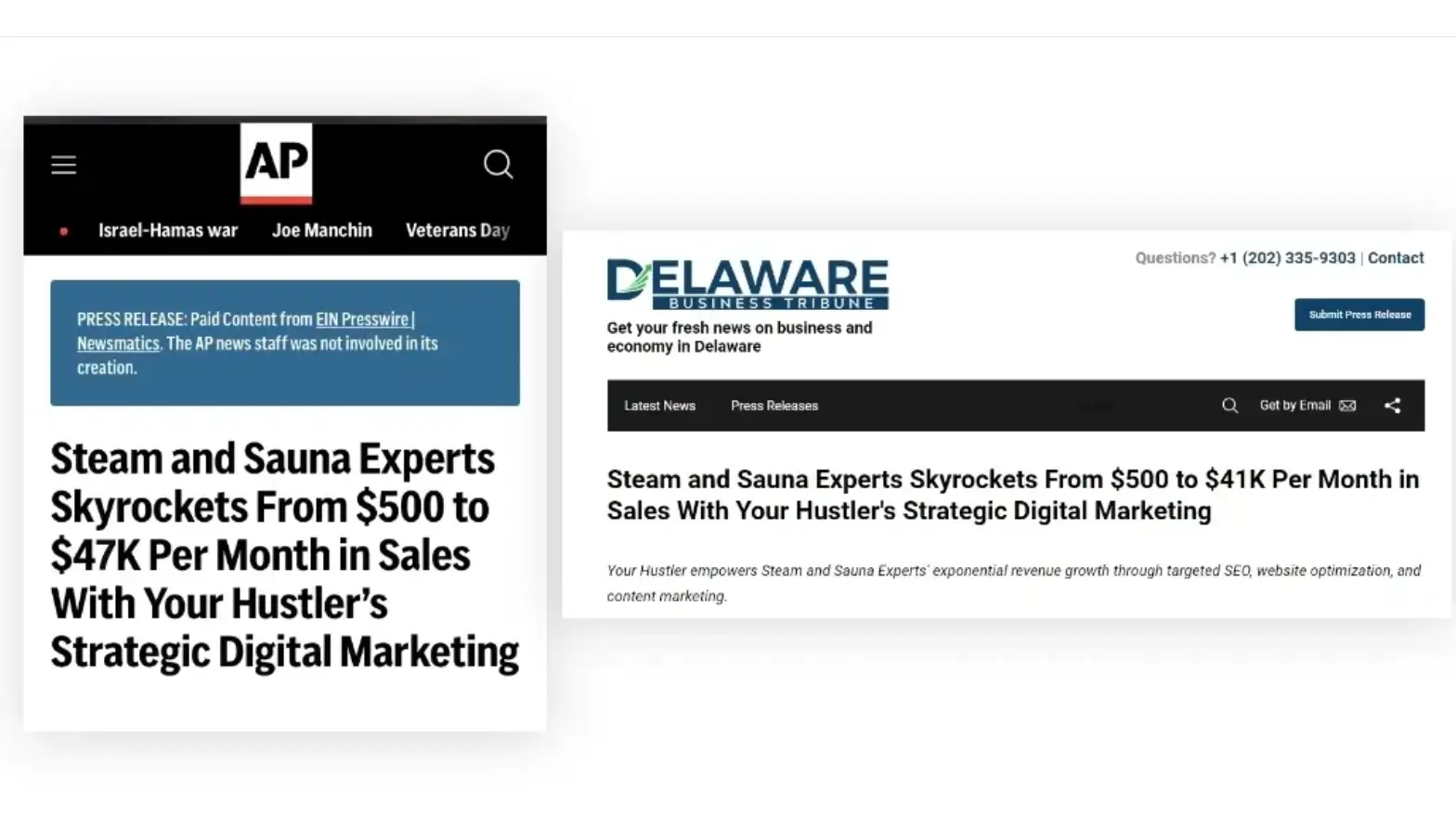
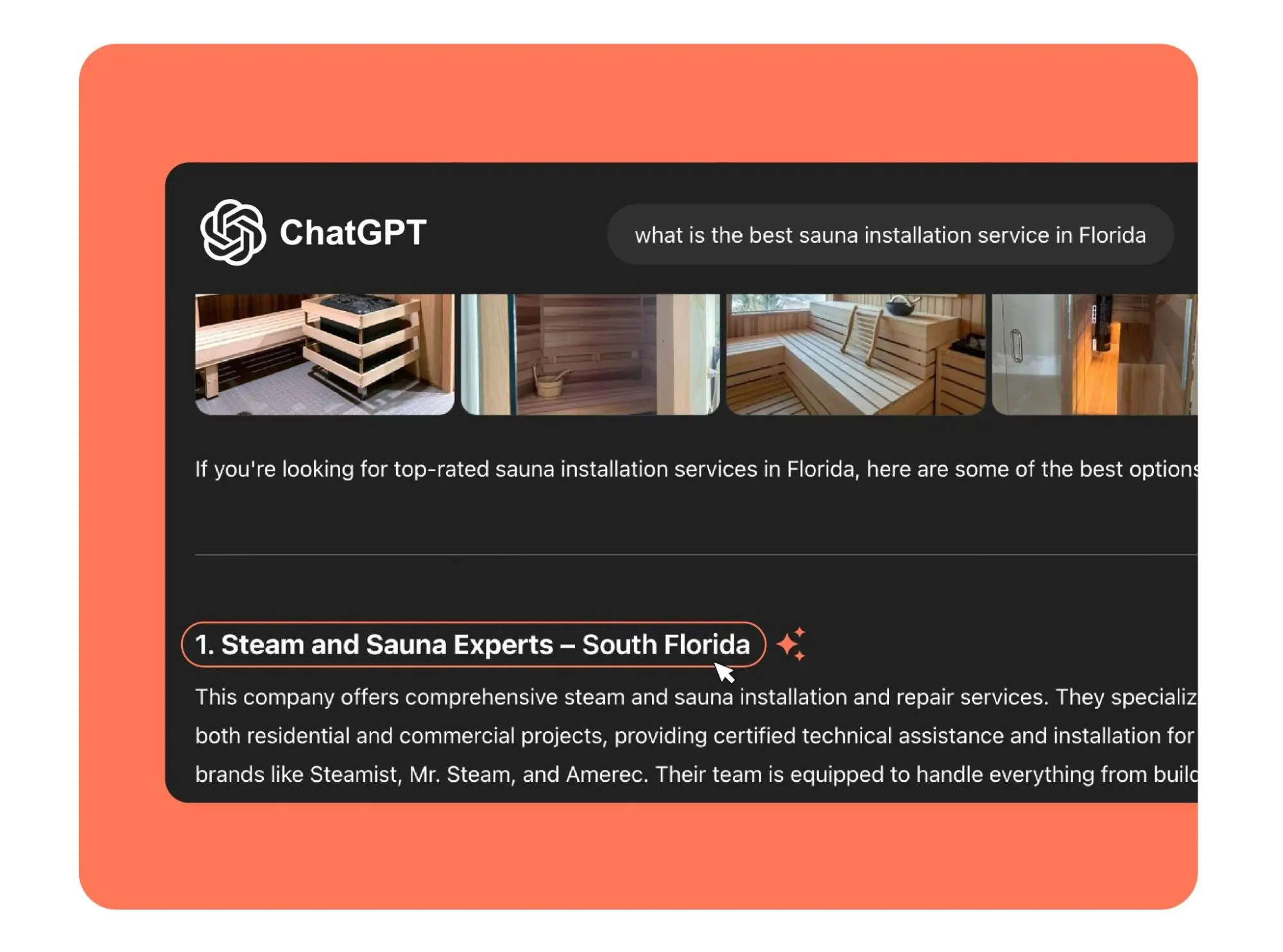
For instance, our client Juan’s Steam and Sauna Experts got featured in reports on AP News, CBS, and more. And this is one of the many factors that help them consistently appear on ChatGPT when users ask about the best sauna installation service in Florida.

image-4
image-5

B. Be present where LLMs learn

LLMs digest platforms that are “trainable.” Meaning content on these platforms are consistently scraped, archived, or referenced in ChatGPT knowledge bases.

So, I suggest you build content and activity on:

  • Reddit: Subreddits relevant to your industry
  • Quora: Answer niche-specific questions
  • Medium & Dev.to: For tech and B2B content
  • YouTube (with optimized transcripts)

Pro tip: When you post on Reddit or Quora, include your brand name, location, and website in your answers organically. LLMs associate these patterns with real-world entities.

C. PR, guest posts, and thought leadership still work

Traditional PR isn’t dead, it’s just evolving.

Here’s what you should do:

  • Secure mentions in online publications, not just for backlinks but for entity recognition
  • Write guest blogs on platforms already included in Common Crawl (Medium, Substack, etc.)
  • Get interviewed on podcasts or industry blogs (with transcripts published)

LLMs weigh the repetition of association. So, if your brand is repeatedly described, for instance, as “a top-rated lawyer in El Paso” across platforms, that’s how ChatGPT will likely describe you too.

In short: AI doesn’t just “crawl” your website, it learns from the web’s collective consensus.

Build your presence where LLMs look for signals on reputable domains, user discussions, and in structured mentions. You don’t need thousands of links, you need the right ones from the right places.

3. Optimize for entity recognition (brand, people, products)

To rank in ChatGPT search, it’s not enough to have good content. You need to make sure that ChatGPT understands who you are, what you offer, and how you’re connected to your niche. This comes down to one core principle: Entity optimization.

A. Work towards entity recognition

Entity recognition matters in LLMs. That’s because ChatGPT and other AI tools don’t “index keywords” like Google used to. Instead, they learn from relationships between people, places, products, and ideas. 

This means you need to establish your brand as a recognized entity within your industry.

B. Use schema markup for entity definition

Structured data is critical to help AI systems understand your brand. And to that end, schema markup tells machines explicitly what a page or brand is about.

You can add the following schema types:

  • Organization – name, logo, address, contact info
  • Person – if you’re building thought leadership (CEO, expert, etc.)
  • Product – for SaaS tools, services, or physical goods
  • FAQPage, Article, Review, HowTo – for content-rich entities
  • LocalBusiness – if you serve a specific geographic area

Here’s why these schema types are important:

Schema Type Use Case AI Benefit
Organization Define your brand Helps AI understand business name, location, logo
Person Expert content or personal branding Ties thought leadership to known entity
FAQPage Q&A format content Improves match with ChatGPT-style prompts
Product/Service SaaS or ecommerce pages Makes offerings explicit for AI parsing
LocalBusiness Local SEO relevance Boosts local mentions in AI and search tools

C. Reinforce brand mentions with proper context

LLMs thrive on contextual clarity. So, don’t just mention your brand name but repeat it in association with your niche, location, or specialty.

For instance, instead of saying “We’ve helped many clients…,” you can say “At Bella Skincare Spa in Austin, TX, we’ve helped over 500 clients improve their skin health with advanced acne treatments.”

Repeat these associations across your homepage, blogs, interviews, and social profiles to build a strong semantic relationship.

D. Create glossaries and internal definitions

LLMs love clarity. And most powerful tools you can build to provide ChatGPT with clarity are:

  • A glossary or internal definitions page
  • Topic pillar pages that define your approach
  • Explainers that break down industry-specific terminology

These get indexed more easily, cited more often, and help position you as an authority in the subject matter.

Pro tip: Have well structured internal linking

Every time you mention your brand, product, or service on your site, link back to your About page, product pages, or glossary using descriptive anchor text.

For instance:

“Learn more about how our Hustler Revenue Accelerator System helps you gain 10 extra clients monthly.”

This helps both users and LLMs associate the right terms with your brand.

Bottom line: ChatGPT doesn’t “rank” based on just keywords, it surfaces entities they understand and trust. So, make yourself legible to machines by using structured data, repeating context-rich mentions, and building content that defines who you are, what you do, and why it matters.

4. Format for LLM readability

Even if your content is brilliant, if it’s not machine-readable, it won’t be used. After all, language models like ChatGPT don’t just look at what you say, they also consider how it’s structured.

So, format your content for maximum clarity and extractability, and you’ll make it easy for AI to pull you into answers, summaries, and citations.

Here’s what you should do:

A. Use clean semantic HTML

AI systems process the HTML structure of a webpage to understand hierarchy and meaning.

Here are some of the best practices you can follow:

  • Only one <h1> per page for the main topic
  • Use <h2>, <h3>, and <h4> for logical subtopics
  • Lists (<ul>, <ol>) are more likely to be extracted as bullets
  • <strong>, <em>, and <blockquote> help AI interpret tone and emphasis
  • Avoid bloated <div> tags or JavaScript-heavy rendering

Why does it matter?

LLMs often repurpose content into snippets. So, clear HTML increases the chance your content is reused or cited.

B. Have TL;DRs, key takeaways and FAQs

ChatGPT often favors content that provides summary-ready insights. And to rank here, I suggest you use these formats:

  • “TL;DR” or “Key Takeaways” at the top or bottom of articles
  • FAQs answering direct conversational questions
  • Use exact phrasing like:
    “Can small businesses rank in ChatGPT search?”
    “What is the best way to improve AI visibility?”

This aligns directly with the prompt structure ChatGPT users type, improving your chances of being featured.

C. Keep it clear, simple, and precise

AI doesn’t like fluff. It looks for direct, concise, and fact-based language.

You should not:

  • Overuse metaphors or creative phrasing that obscures meaning
  • Write long, meandering paragraphs

You should, instead: 

  • Aim for 3–5 sentence paragraphs
  • Use clear definitions for niche terms
  • Include data, numbers, and examples where possible

D. Answer one question per section

Segment your content with clear subheadings that double as user prompts.

For instance:

  • “How does ChatGPT decide what to cite?”
  • “What’s the difference between Bing Copilot and ChatGPT?”

This structure mirrors how users search and how LLMs are trained to retrieve.

E. Use tone that’s both conversational and credible

To rank on ChatGPT, your content should feel:

  • Natural enough for a human to understand
  • Factual enough for AI to trust

This balance helps you stand out when users ask for “trusted sources” or “best content about [X].”

Bottom line: The way your content is structured directly impacts whether ChatGPT can parse and cite it. So: 

  • Structure with semantic HTML
  • Use clear subheadings and bullet points
  • Add FAQs, summaries, and direct answers
  • Keep language crisp, factual, and extractable

5. Get indexed in Common Crawl (and others too)

If your website isn’t included in the datasets large language models like ChatGPT were trained on, you’re practically invisible to them. 

One of the most critical of these datasets is Common Crawl, a publicly available web archive that feeds data into AI models used by OpenAI, Anthropic, Meta, and others.

What is Common Crawl?

Common Crawl is a non-profit organization that crawls the open web every month, storing billions of web pages in its archives. Many AI developers use this data as part of their model pretraining.

LLMs like GPT-4 likely rely heavily on Common Crawl snapshots (alongside sources like Wikipedia, GitHub, books, etc.) to learn language and recognize reputable content.

How to check if your site is in Common Crawl?

While there’s no official “Common Crawl search engine,” here are a few methods:

  • Use Common Crawl Index – search by domain
  • Use this Simple Python Tool to check at scale
  • Visit [ChatGPT’s “What do you know about [brand]?”] and infer if content is present
  • Try Perplexity.ai and see if your site is cited for a double-check

Now that you know the basics about Common Crawl, here’s how you can ensure your content is findable, trainable, and AI-visible.

A. Make your site AI-friendly to crawlers

To appear in Common Crawl and other datasets (like OpenWebText or LAION), your site must be crawlable and accessible.

Here’s a checklist you can follow: 

  • Allow GPTBot and Common Crawl in robots.txt 
  • Avoid paywalls, logins, or JS-heavy rendering
  • Use canonical tags properly and avoid duplicate content confusion
  • Submit sitemaps to Google Search Console and Bing Webmaster Tools
  • Use fast, responsive design (Core Web Vitals impact crawlability too)

You see, AI scrapers (like Perplexity’s Arxiv-type pipeline) skip broken or blocked content. So, clean architecture and permission signals are essential.

B. Get Links from “trainable” sites

Even if your domain isn’t frequently crawled, you can appear in Common Crawl via mentions on high-traffic, AI-indexed platforms.

You should prioritize:

  • Wikipedia (cited heavily in pretraining datasets)
  • GitHub, Stack Overflow, Reddit, Hacker News
  • High-DA blogs and media outlets
  • Quora, Medium, Notion public pages
  • Niche industry directories (especially those scraped by AI)

These platforms are regularly ingested into LLM datasets, so getting cited on them increases your indirect visibility.

TL;DR: To rank on ChatGPT, you should exist in the places it learns from. That starts with Common Crawl but includes anywhere AI models extract data from. 

6. Create evergreen and cite-worthy content

Ranking on ChatGPT isn’t just about keywords or backlinks, it’s about being worthy of citation by an AI model trained to surface useful, high-quality information. 

And the best way to do that? 

Build content that never goes out of style.

Why does evergreen content matter?

ChatGPT (and other AI systems too) prefer citing information that’s:

  • Timeless: Continues to be relevant months or years from now
  • Factual & referenceable: Explains core concepts clearly
  • Structured & digestible: Easy for AI to parse and repurpose
  • Trusted: Linked to sources, backed by real expertise

Evergreen content becomes part of the AI source layer, keeps resurfacing, getting referenced, and powering answers across queries and platforms.

What content types AI loves to cite?

Not all content is created equal in the eyes of AI. Here are the top formats that consistently get picked up, embedded, and cited:

Format Why It Works
How-To Guides Step-by-step clarity. Perfect for summarization and reuse.
Glossaries Clean definitions of industry terms. Valuable for contextual embedding.
FAQs Mirrors natural language queries. Easy for AI to match against prompts.
Case Studies Original insights + real-world application = high E-E-A-T.
Research/Data Reports Authoritative. Models love statistics and unique frameworks.
Comparisons & Tool Lists Used in recommendation answers (e.g., “best CRM tools”).
Checklists Skimmable, structured content. Often turned into TL;DRs or snapshots.

How to write for AI and human readers?

To ensure your content gets cited and converts, blend human nuance with AI-readability. Here’s how: 

  • Use consistent headings (<h2>, <h3>) with clear semantic structure
  • Answer one question per section — avoid long rambles
  • Include TL;DR or key takeaway summaries
  • Use tables, bullet points, and short paragraphs
  • Add examples, analogies, and frameworks that make the content unique
  • Link out to trusted sources to boost credibility
  • Update your content quarterly to maintain freshness signals

Pro tip: Write each article with this question in mind: “Would ChatGPT quote this as an answer?”

TL;DR:: If you want to rank on ChatGPT, create timeless, structured, valuable, and easy to quote. To that end: 

  • Invest in content that explains, defines, compares, and solves
  • Make it skimmable and AI-parsable
  • Update regularly and link with intent
  • Add unique ideas and frameworks

7. Build a custom GPT or embed in RAG systems (optional)

While optimizing for citations in ChatGPT is crucial, one of the most powerful (and underused) strategies is to bypass traditional discovery entirely. And you can do so by creating or embedding your own content into the very systems users are querying.

Here’s how it works:

A. Create your own GPT (ChatGPT pro users)

ChatGPT Pro allows anyone to build a custom GPT, a specialized AI assistant tailored to a niche, topic, or use case.

Here’s how it helps you rank on ChatGPT search:

  • You control the training context
  • Your content gets surfaced as the answer
  • You build brand recall inside the tool itself

Here’s are a few niche based example of how it work:

Niche Custom GPT Idea
Legal “Ask a Small Biz Attorney” trained on your FAQs and blog
SaaS “CRM Setup Coach” using your onboarding docs + help center
Fitness “Ask Your Hustler Coach” for workout plans based on your guides

B. Embed your content in RAG (retrieval-augmented generation) systems 

RAG models retrieve answers from external knowledge bases at query time. This means you can feed AI models content you want them to use. 

But to do so, you’ve to control or integrate with the source.

Here’s what you can do:

  • Partner with AI apps using your data as source content
  • Host embeddable datasets, docs, glossaries, or APIs
  • Ensure your knowledge base is cleanly structured and crawlable
  • Use tools like LangChain or LlamaIndex to deploy your own RAG-based bots

For instance, if you’re a SaaS brand, make sure your Help Center is:

  • Crawled by Common Crawl
  • Connected to GPTs via RAG pipelines
  • Indexed with vector search engines (e.g., Pinecone, Weaviate)

C. Integrate with plugins, APIs and third-party tools

Besides OpenAI, other AI platforms support external content ingestion via:

  • APIs let developers or AI models pull your data dynamically
  • Zapier/OpenAI integrations make your data queryable
  • Custom Slack or Notion bots that interact with your documentation
  • Knowledge-sharing networks like Stack Overflow or GitHub (for dev tools)

If your brand powers a tool or workflow, make sure it’s accessible in AI-native environments.

Here’s a checklist to make your brand a part of the AI stack

Action Description
✅ Create a Custom GPT Use ChatGPT Pro to build an assistant that reflects your brand
✅ Add structured data Feed content to RAG or vector stores via structured knowledge
✅ Embed in third-party GPTs Partner with others or submit data for use in AI agents
✅ Offer API access Make your tools and data easy to plug into smart apps
✅ Maintain clean, AI-readable knowledge bases Use semantic markup, sitemaps, and schema


In short: Ranking on ChatGPT is powerful. But becoming part of the response layer through Custom GPTs and embedded knowledge gives you persistent and branded visibility.

8. Monitor AI visibility and feedback loops

Image-7

Ranking on ChatGPT or being cited in other AI assistants isn’t a one-and-done effort. Instead, it’s an ongoing game of visibility, feedback, and refinement. 

Once your brand is optimized for AI search, it’s time to track how and where you’re showing up and adapt based on what you find.

Here’s how you can do so:

A. Ask the AIs directly

ChatGPT

  • Ask: “What do you know about [Brand Name]?”
  • Try queries users might use to discover your service.
  • Use ChatGPT-4 with browsing enabled for the most up-to-date insights.

Why does it work:
LLMs don’t just search, they synthesize. How your brand is summarized reflects how well your authority and structure are being interpreted.

Perplexity.ai

  • Search for your brand, products, or key topics.
  • Pay close attention to the “Sources” section in the answers.
  • Look for direct citations, URL links, and summaries resembling your web copy

Claude (Anthropic)

  • Ask questions related to your domain or brand.
  • Claude often “remembers” broader context which is useful for visibility tracking.

B. Monitor snapshots and AI summaries

Monitoring snapshots and AI summaries gives you practical insights. Here are some tools you can use to do so:

  • Glasp: Highlights how your pages are cited or excerpted.
  • ChatGPT Browsing History to see what URLs GPT visits for answers.
  • Chrome extensions like SGE SERP Analyzer for Google AI Overviews.

Pro tip: Re-run queries monthly to see if you’ve gained or lost visibility.

C. Build your own AI visibility dashboard

You can build your AI visibility dashboard by combining: 

  • GPT API to auto-query brand visibility questions
  • SERP tracking tools (like Semrush, Ahrefs) for traditional SEO overlap
  • Mentions tracking tools (e.g., Brand24, Mention) for social & web buzz
  • Perplexity API (beta) for source tracking

Also, you should set up alerts for:

  • Brand name mentions
  • Keyword + brand citations
  • AI snippet changes

Bonus: Watch out for the following signals

Signal What It Tells You
You’re cited but not linked Add structured data or clarify context
Brand not showing in ChatGPT Improve entity mentions + third-party citations
Incorrect info in AI answers Publish glossary/FAQ to correct it semantically
Competitors outranking you in AI Study their structure, citations, and schema use

Bottom line: AI visibility is dynamic. The best brands don’t wait to be discovered, they validate their presence across AI tools, just like with search engines.

Checklist to check and improve AI visibility

Task Tool/Method Purpose
Check if you’re cited Ask ChatGPT or use Perplexity.ai See if your brand/content appears
Track citation changes Re-run queries monthly Monitor ranking volatility in AI answers
Audit crawlability robots.txt + site audit Ensure GPTBot and Common Crawl can access you
Monitor brand mentions Brand24, Mention, Glasp Track summaries, paraphrased use, and visibility
Fix AI misinformation Publish glossary, FAQ, and About pages Give LLMs consistent and accurate references

Final takeaway

How is AI keyword research different from traditional SEO?

Ranking on ChatGPT is no longer about optimizing for algorithms alone, it’s about earning trust at scale. After all, you’re not just chasing position #1 on a traditional SERP; you’re becoming the answer itself.

To do that, your brand must exist at the intersection of authority, structure, and semantic clarity. You need to be:

  • Cited consistently across trusted platforms
  • Structurally optimized for language models to parse and repackage your content
  • Contextually relevant, tied to topics and terms that define your niche
  • Technically visible, indexed in foundational LLM sources like Common Crawl
  • Strategically proactive, monitoring how AI tools describe and represent your business

When AI knows you, trusts you, understands you, and features you.

Got more questions or need to optimize your website for ChatGPT rankings? 

Get in touch with us!

At Your Hustler Inc., we are at the forefront of AI optimization helping businesses like yours win AI visibility. We help you get measurable ChatGPT gains and make your business thrive. 

Frequently asked questions about ranking on ChatGPT search

Does ChatGPT pull real-time web data?

By default, ChatGPT (GPT-4) does not access the real-time web, unless using the “Browse with Bing” feature available to Plus users or a Custom GPT with plugins or APIs. 

However, it draws from a vast pool of pre-trained data, including websites indexed in Common Crawl, Wikipedia, GitHub, and public forums.

How often is the ChatGPT model updated?

OpenAI updates its core models periodically. 

For instance, GPT-4 was released in March 2023, and new training cycles may roll out semi-annually or annually. 

However, browsing and plugin-based models can access live data continuously.

Can small businesses rank on ChatGPT?

Absolutely!

In fact, local and niche businesses often stand out when their content is structured, clear, and well-represented across directories (Google Business Profile, Yelp), review sites, and forums like Reddit.

How do I know if my brand is being cited?

Ask ChatGPT using prompts like:

  • “What do you know about [Your Brand]?”
  • “Who are the top [industry] experts in [city]?”
  • “Which tools help with [specific task]?”

Also, try tools like:

  • Perplexity.ai (check citations)
  • Google’s SGE (Search Generative Experience) snapshots
  • Brand monitoring tools (Mention, Brand24, etc.)

Is ChatGPT replacing SEO?

ChatGPT is not replacing SEO, it is evolving it. 

Traditional SEO focused on SERP rankings; AI search focuses on entity understanding, brand trust, and semantic authority.

In today’s landscape, SEO = Search Everywhere Optimization. And ranking on ChatGPT is part of that larger visibility puzzle and critical for future-proofing your brand.

6 Simple Keyword Research Tips For Small Businesses For AI SEO

Keyword research used to be easy. Just find a popular search term, add it to your website, and hope Google puts you on page one.

But now, things have changed.

People aren’t just typing short keywords anymore. They’re asking full questions like:

  • Which plumber is open late near me?
  • Can I write this off as a small business owner?
  • Best curly hair salon in East Austin?

And tools like Google AI Overviews, ChatGPT, and voice assistants are giving answers, often without showing a list of websites.

So, if your business isn’t showing up in those answers, you’re missing out.

This is exactly why I’ve compiled my AI-ready keyword research tips for small businesses like yours. Here, I’ll walk you through how to find the right keywords that work for both traditional Google search and AI tools.

You’ll learn:

  • How to find questions your customers are really asking
  • What kind of keywords help you show up in AI answers
  • Simple ways to use those keywords on your website

No fluff or tech talk, just clear tips that help real businesses get found online.

Let’s dive in.

Key Takeaways

  • Old keyword tricks don’t work like they used to.
  • AI tools now care more about clear answers than repeated keywords.
  • People search by asking full questions, so write like they talk.
  • Small businesses can beat big ones by being more helpful and local.
  • Use tools like ChatGPT, Google Keyword Planner, and AnswerThePublic to find real questions.
  • Focus on specific phrases like “emergency plumber in East Austin” instead of broad terms.
  • Organize your content with clear headings and FAQs to help AI understand it.
  • Refresh your keyword strategy every few months to keep up with changes.

What is keyword research?

Keyword research is a way to figure out what your potential customers are typing into Google (or even asking AI tools).

This is not just for big companies or marketing experts.

For small businesses like yours, it’s a smart way to connect with people who are already looking for what you offer.

For example, let’s say your potential customer searches for:

  • Family dentist in South Philly

Or

  • Best vegan bakery near me

Now, if your website includes those words and answers their question, you’ve got a better shot at showing up in results.

So your real goal is this: Understand how people ask questions and create simple and helpful content that answers them.

You see, keyword research is not about chasing the most popular keywords. You simply want to show up for the right people, in the right place, at the right time, be it on Google, ChatGPT, or other search tools.

Do it right and this will help your business get seen, build trust, and even beat bigger brands.

Has keyword research changed?

Yes, it has.

Before, it was all about stuffing the exact keyword into your page and trying to rank on Google.

But now, people search using full questions, and the new AI-powered Google and tools like ChatGPT give answers instantly.

So, instead of chasing high-volume words, your goal is to answer real questions in a clear and helpful way.

Here’s what has changed and how you can adapt:

Here’s what has changed and how you can adapt:

Old SEO New AI Search
Use exact keywords repeatedly Use natural full-sentence questions
Ranking = traffic Helpful answer = visibility
Focus on Google search Focus on AI, voice, and social search too
Static keyword lists Flexible real-world questions
Stuffed content Clear, helpful, easy-to-read content

What are some keyword research tips small businesses can follow?

Image-3

As a small business, your content needs to match how your customers talk, what questions they ask, and how AI tools find answers.

The good news?

As a small business, you don’t need a big budget. You just need to be more helpful and clear than the big guys.

Here are some simple keyword tips to help your business get found by your potential customers.

1. Start with what problems your customers are trying to solve (not just what you sell)

When people search online, they’re usually not typing in your product name. They’re asking for help.

That’s why it’s better to focus on the problems your customers are having and not just the services you offer.

So, instead of using the keyword “teeth whitening service,” think about what someone might actually ask.

For instance:

“How can I whiten my teeth quickly before my wedding?”

That’s the kind of question people ask and the kind of thing tools like ChatGPT and Google’s AI love to answer.

To find these types of problem-based questions, try this:

  • Pay attention to what customers ask you on calls, emails, or in person
  • Start typing something into Google and see what it suggests
  • Check out Reddit, Facebook groups, or Quora and see what people are asking
  • Look at your competitors’ FAQs and customer reviews for inspiration

This will help you speak your customer’s language, not marketing lingo, and show up in the places they’re actually looking for help.

2. Pay attention to how people actually ask questions

These days, people don’t just type a few words into Google. They talk to their phones, smart speakers, or even tools like ChatGPT.

This means their questions sound more like real conversations.

Think about it:
Instead of typing “HVAC repair,” someone might ask, “Who can fix my AC fast in Dallas?”

That’s exactly what today’s search tools are built to understand.

So when you’re creating content (like website pages or blog posts), try to include full, natural questions.

Here are a few things that make great blog titles, section headers, and FAQs on your website:

  • Why is my furnace making a weird noise?
  • Is there a same-day plumber near me?
  • How much does teeth whitening cost in Brooklyn?

Need ideas for what people are asking? Try:

  • Typing your service into Google and seeing what it suggests
  • Clicking on “People Also Ask” in Google results
  • Using free tools like AnswerThePublic or AlsoAsked
  • Asking ChatGPT: “What are 20 questions someone might ask before hiring a [your service] in [your city]?”

Your goal is simple: Show up when people ask real questions, in their own words.

Here’s how people search these days:

Type of Search What People Might Ask What You Should Do
Voice Search What’s the best Thai food near me that’s open now? Use natural-sounding phrases and add words like “near me”
Ready to Buy Emergency HVAC repair in North Dallas with good reviews Use detailed phrases that show urgency and location
Looking for Info How much does Invisalign cost in Brooklyn? Create helpful content that explains things clearly and locally
Local + Urgent Need Same-day passport photo service in downtown LA Include your city, service, and words like “same-day”

3. Let AI help you come up with more keyword ideas (and organize them)

Once you have a few good keyword ideas, you don’t have to figure everything out on your own. Let AI give you a hand.

You can use tools like ChatGPT to help you:

  • Come up with more keywords people might use
  • Group those keywords based on where someone is in the buying process

Here’s how that works:

Let’s say you run a plumbing business in Austin. You could ask ChatGPT: Give me a list of keyword ideas for a local plumbing business in Austin, some for people just researching, some for people comparing options, and some for people ready to book.

It’ll give you organized keyword ideas like:

  • Just researching: Why is my water pressure low?
  • Comparing options: Best affordable plumbers in Austin
  • Ready to book: Same-day plumber near me open now

You can use these ideas to plan:

This saves you time and helps you show up for real questions people are asking.

Here is a simple keyword planning strategy using AI:

Stage of Customer Journey Example of What They Might Search Best Type of Content to Create
Just Looking Why is my furnace making noise? Blog posts, FAQs that explain the problem
Comparing Options Best HVAC companies near me with financing Service pages, comparison guides
Ready to Buy Schedule same-day AC repair in Austin Booking pages, Google Business listing, contact info

4. Use super specific keywords, especially for your local area

If you want your business to show up when people are searching on Google, Siri, or ChatGPT, details matter.

So, instead of using general words, try to be as specific as possible.

These extra-detailed keywords are called long-tail keywords and they’re your secret weapon, more so if you’re running a local business.

For example, instead of just saying:

  • Vegan bakery

Try:

  • Best vegan bakery open on Sunday in downtown Tulsa

Or instead of:

  • Dog groomer

Try:

  • Emergency dog groomer near East Austin with good reviews

Notice how these include helpful details like location, timing, and urgency?

That’s exactly the kind of stuff people type or say when they need something right now. And AI tools are built to pick up on those signals.

You can also try adding words like:

  • Near me
  • In [your neighborhood or city]
  • Open now, emergency, same-day
  • Top-rated, affordable, or trusted

These help you show up for the people who are ready to take action.

Here are some keyword examples that work well for local search:

Type of Keyword Example Why It Works
Very Specific (Long-Tail) Affordable Invisalign for teens in Queens NY It’s clear, detailed, and shows someone is ready to buy
Local & Timely Plumber open Sunday in East Atlanta Shows urgency and exact location, perfect for local search
Voice Search Style Where can I get a haircut near me now? Sounds like how people talk to Alexa or Siri
Problem-Solving How to remove pet odor from couch quickly Answers a real-life problem. AI loves helpful content

5. Check how popular and relevant your keywords are

It’s good to know how many people are searching for a keyword, but that’s not the only thing that matters anymore. AI cares more about whether your content really answers what people want.

Here’s what you can do:

  • Use free tools like Google Keyword Planner or Ubersuggest to see how often people search for certain words.
  • If you want more detail, tools like Semrush or Ahrefs can show how hard it is to rank for those words and spot trends.
  • Ask ChatGPT something like: Which keyword would AI prefer: [Keyword A] or [Keyword B], and why?

This helps you pick keywords that make the most sense, not just the most popular ones.

6. See what keywords are already getting you noticed by AI

Want to know if Google AI, ChatGPT, or others are already talking about your business?

Here’s a simple way to check:

  • Ask ChatGPT questions like:

Who’s the best [your service] in [your city]?

What do customers say about [your business]?

  • Try typing your keywords into sites like Perplexity.ai and see if your business or your competitors show up.
  • Search your business name on Google, Gemini, or Claude to see what they say about you.

Doing this helps you understand how AI sees your business. Then, you can create content that matches or improves that picture.

You might also want to read: How To Get Into Google AI Overviews?

Which tools can you use for AI-friendly keyword research?

Image-3

You don’t need fancy, expensive software to find good keywords for your business. There are plenty of free or affordable tools that help you find the kind of questions and search terms your customers actually use.

These tools make it easier to create content that AI-powered search engines and voice assistants like.

Here’s a list of the best tools to get you started without spending too much:

1. SEMrush: Great for growing small businesses

SEMrush is a powerful tool used by many marketers. If you want to invest a little to get a lot, this is a top choice. It helps you:

  • See how hard it is to rank for certain keywords
  • Check what keywords your competitors are using
  • Track your website’s rankings in different places
  • Find ways to improve your site and content

If you want one tool that does it all and grows with your business, SEMrush is a solid pick.

2. Ahrefs: A favorite for detailed SEO work

Ahrefs is popular for good reason. It offers:

  • A big database of backlinks to help you build links
  • Keyword research with search volume and difficulty info
  • Tools to see what keywords your competitors rank for that you don’t
  • Insights on how websites get their traffic

Pro tip: Use Ahrefs to find question-based keywords, perfect for FAQ pages and blog posts.

3. Google Keyword Planner: Free and reliable

This tool comes free with a Google Ads account and is a classic choice for beginners. It lets you:

  • See estimated search volume for keywords
  • Target specific locations
  • Explore different keyword matches

Pro tip: Don’t just look at search numbers, use AI tools like ChatGPT alongside Google Keyword Planner to understand what people really want.

4. Moz Keyword Explorer: Easy for beginners

Moz is great if you’re new to SEO. It gives you:

  • Scores that show how hard keywords are to rank for
  • Estimates of how many people click on search results
  • Info on who’s ranking and what content works best

It’s perfect for creating content that AI and real people both like.

5. Ubersuggest and Mangools: Budget-friendly all-in-one tools

If you want a simple and affordable toolset, these are excellent. They offer:

  • Difficulty scores for keywords
  • Info on who ranks for what
  • Local keyword filters for your neighborhood or city

Mangools’ KWFinder is especially easy to use and great for finding local keywords and long-tail phrases.

6. AlsoAsked and AnswerThePublic: See what questions people ask

These tools gather real questions people type into search engines.

  • AlsoAsked groups related questions, helping you organize your content better
  • AnswerThePublic shows visual maps of questions sorted by who, what, why, and how

Use these insights to create content that AI search results love to show.

7. ChatGPT and Gemini: To brainstorm questions

Want to know what questions your customers might ask?

Use AI!

You can try asking: What are 20 nAlsoAskedatural language questions someone might ask before hiring a [your business type] in [your city]?

This gives you lots of ideas for blog posts, FAQs, or videos. It’s like having a focus group ready anytime you want.

To sum it up

In the past, SEO was mainly about getting to the top of Google’s list of links. But things are changing fast. Now:

  • Getting noticed by AI tools is how you get your business in front of people first
  • It’s not just about stuffing keywords as you need to sound natural and helpful
  • AI picks answers based on how clear, well-organized, and trustworthy your content is

So, write like you’re talking to your customers, but also keep in mind how AI reads your content.

When you do that, you don’t just appear in search results, you get picked by AI as the best choice.

Got questions or want help building a simple AI SEO plan for your business?

Reach out to us!

At Your Hustler Inc., we specialize in helping small businesses like yours get noticed by AI through clear, trustworthy content and smart strategies. We’ll help you grow your visibility and make your business shine on AI-powered platforms.

Frequently asked questions

How is AI keyword research different from regular SEO?

Old-school SEO was all about matching exact words and getting high rankings. Now, AI SEO focuses on natural, clear, and helpful content that AI can easily understand and use.

What’s the best free tool for finding keywords for small businesses?

You can try these:

  • ChatGPT or Gemini for fresh ideas
  • Google Keyword Planner to see how many people search certain words
  • AlsoAsked to find real questions people are asking
  • Google Search Console to check what’s already bringing visitors to your site

Should I still care about keyword difficulty?

Yes, but in a smarter way.

Go for easy-to-rank specific phrases that real people actually use and not just popular broad terms.

How can I tell if AI tools are using my content?

Ask AI questions like:

Who are the best [your service] providers in [your city]?

Check tools like ChatGPT, Perplexity, or Claude to see if your business shows up.

Also, you can use AI search visibility tools to track mentions.

Is ChatGPT replacing Google for keyword research?

Not at all!

ChatGPT is a helpful sidekick to Google. It helps you find natural ways people ask questions and keeps you on top of what’s trending.

A Step-by-Step Google Business Profile Optimization Checklist For AI Visibility

If you run a local business, you probably already know the importance of being on Google.

But here’s what most people don’t realize: Nowadays, your potential customers are finding local businesses in all kinds of new ways.

They are not just typing into Google, but they’re asking Siri, Alexa, or even tools like ChatGPT.

They might say:

“Hey Google, who’s the best electrician near me?” “Siri, what restaurants are open right now?” “ChatGPT, who fixes AC units in my town?”

And guess what?;

All of these tools get their information from the same place, your Google Business Profile or GBP.

So, if your profile isn’t set up right, or worse, not set up at all, your business might not show up anywhere in these results. This means fewer calls, fewer customers, and missed opportunities.

That’s exactly why I created this easy step-by-step Google Business Profile optimization checklist to help everyday business owners like you get seen by more local customers. This checklist will help your business become visible across Google, voice search, and AI tools.

Let’s get right into it.;

Key Takeaways

  • Your Google Business Profile helps you show up on Google and in AI tools like ChatGPT and Siri.
  • Make sure your profile is verified, otherwise Google and AI might ignore it.
  • Use simple keywords (like your service + location) in your profile, posts, and reviews.
  • Get more reviews and reply to them. AI tools pay attention to what people say about you.
  • Add real photos and videos of your shop, team, or work to build trust.
  • Keep your business name, address, and phone number the same everywhere online.
  • AI doesn’t just care about websites, it wants fresh, complete, and trusted info.
  • Stay active by posting updates, answering questions, and replying to customers.
  • Add buttons like “Call Now” or “Book Online” so people (and AI) can take action fast.
  • Keep improving your profile. The businesses that stay active will keep getting found.

What is a Google Business Profile optimization checklist?

For business owners like you a Google Business Profile is like your store’s front door on the internet. It’s often the first thing people see when they search for your business or the services you offer.

At the same time, a Google Business Profile optimization checklist is a simple to-do list that helps you make your profile stand out. It turns your basic listing into a powerful tool that can bring in more calls, messages, bookings, and even visits to your store.

In simple terms, this checklist helps you make sure your profile is:

  • Claimed and verified, so Google knows it’s your business and trusts it.
  • Filled with the right words about your services and location, making it easier for people nearby to find you.
  • Ready for smart tools like voice assistants (think Siri or Alexa) and AI tools (like ChatGPT) to use your info.
  • Kept fresh with new photos, updates, and reviews, so Google sees your business is active and trustworthy.

Why is GBP optimization so important right now?

Today, more people are using the new AI-powered Google and similar tools like ChatGPT, Siri, or Alexa to find local businesses than ever before.;

And they don’t always visit your website. Instead, they ask a question, and these AI tools give them quick answers, which is also why businesses are now doing AI search optimization.

But here’s the thing: These tools only trust businesses with up-to-date, complete, and verified Google Business Profiles.

So if your profile isn’t fully set up and kept fresh, Google might just skip over your business and show your competitor instead.

Here’s how different AI tools are already using information from your Google profile:

Here are some AI tools that reference GBP data

Tool How It Uses Your Profile Why It Matters to You
Google AI Overviews Pulls info from your profile to show in search without clicking Your business can show up right at the top
ChatGPT Recommends local services based on trusted data You can be mentioned when someone asks for help in your area
Perplexity AI Looks at reviews, names, and locations from profiles A complete profile helps you get noticed
Gemini (Bard) Uses business info to give better answers The more details you give, the better your chances
Siri & Alexa Uses business info to give better answers The more details you give, the better your chances
Siri & Alexa Use your profile for business name, hours, and phone number Helps people call or find you with voice search

Bottom line: If your profile is empty, outdated, or unverified you’re invisible to all of this.

Who should use this checklist?

If you run a small business and want more people in your area to find you, this checklist is for you.

Here’s who it can really help:

  • Local business owners who want to show up on Google without paying for ads
  • Service-based businesses (like plumbers, roofers, or electricians) who work in specific towns or areas
  • Anyone who wants more calls, more foot traffic, or more bookings without doing fancy online marketing

Basically, if you want your business to be found more easily on Google and smart tools like Siri or ChatGPT, this checklist will help you do so.;

Google Business Profile optimization checklist: Here’s what you need to do

Image-2

By now, you know that just having a basic Google Business Profile (GBP) isn’t enough anymore. That’s because if you want your customers to find your business easily, your GBP profile needs to be fully set up and up to date.;

This goes for customers searching on Google, asking Siri, or using tools like ChatGPT.;

Sounds like a lot?

Rest easy, as I am going to walk you through everything step-by-step through my Google Business Profile checklist.

Each step in this checklist is simple, practical, and designed to help businesses like yours get seen more often and by more people.

Here’s a complete GBP checklist:;

Step What To Do Why It Matters Helpful Tip
1 Claim and verify your Google Business Profile This proves to Google that your business is real and unlocks all features. Use a Gmail account that’s connected to your business website or email.
2 Pick the right category Helps Google know exactly what you do, so you show up in the right searches. Check what categories your top competitors are using on their listings.
3 Fill out every section A complete profile gets more views and is trusted by both people and search tools. Don’t leave out hours, services, or extras like “Wheelchair Accessible.”
4 Use simple keywords Helps AI tools and Google match you with what people are searching for. Use natural phrases like “plumber in Austin” or “24/7 towing in Boise.”
5 Manage reviews and the Q&A section Reviews build trust, both with people and AI tools. Ask happy customers to leave reviews that mention your service + location.
6 Add real photos and videos People and AI both love visuals. It shows you’re a real, active business. Add photos of your storefront, team at work, and before/after shots.
7 Turn on bookings, messaging, and buttons Makes it easier for customers to contact or book you without leaving your listing. Use the Google Business app to reply to messages quickly.
8 Post updates regularly Shows that your business is active and trustworthy. Post once a week with offers, tips, events, or simple updates.
9 Keep your info consistent and check results Keeps Google (and AI tools) confident that your info is correct. Make sure your name, phone, and address are the same everywhere online.

Step 1: Claim and verify your Google Business Profile

Before anything else, you need to make sure you own your Google Business Profile by claiming and verifying it.

Without this step, Google and AI tools like Siri or ChatGPT won’t trust your listing. In fact, they might not show you at all.

Here’s why this step matters:

  • Unverified listings are often ignored by Google and voice assistants.
  • Verified businesses are seen as real and trustworthy, so they get more visibility.
  • AI tools use verified listings when giving answers for queries like, “Hey Google, who’s the best roofer near me?”

Now, to verify your profile, you can:

  1. Go to Google Business Profile and search for your business.
  2. Claim it if it’s already listed. If not listed, create a new one.
  3. Choose one of these verification methods:
    • Phone or text (quick and easy)
    • Email (works if your email matches your website domain)
    • Google Search Console (for websites already verified with Google)
    • Video verification (used in some cases, like high-risk industries)

Pro tip: Use a Google account that’s linked to your business website or domain as it makes the process smoother and faster.

Step 2: Pick the right business categories

Your business category is what tells Google and AI tools what kind of business you are. And it helps your profile show up when people search for services like yours.

So, if you choose the wrong category, or don’t pick one at all, you might miss out on customers who are already searching for what you offer.

Here’s why this step matters:

  • Google and AI tools like Siri or ChatGPT use your category to match you with the right searches.
  • If your category is off, you may not show up even if someone nearby is looking for your service.

Here’s what you should do:;

  1. Pick the most accurate and specific main category. For instance: “Family Law Attorney” is better than just “Lawyer” “Tire Shop” is better than just “Auto Repair”
  2. Add any relevant secondary categories that fit your services.
  3. Check what your top competitors are using:
    • You can use tools like:
    • Or just search on Google. You can:
      • Type your service (like “plumber near me”)
      • Click on top listings
      • See what categories these businesses have listed

Pro tip: Your main category also affects which extra features your profile can use, like appointment booking, menus, or service lists. So choose wisely.;

Step 3: Fill out every part of your profile

If your business profile is only half-filled, it’s like handing someone a menu with missing pages. Both Google and customers won’t like it, and AI tools may skip over you completely.

You see, Google and tools like Siri, Alexa, and ChatGPT want complete and accurate information before they can trust your business. Meaning the more details you give, the better your chances of showing up in search results.

Here’s what you need to fill in:;

  • Business name, address, and phone number (NAP)

Make sure these match everywhere online including on your website, Facebook, Yelp, etc.

  • Website link

Add your website URL. If you want to track clicks from Google, your marketer can add special tracking links (called UTM tags), but that’s optional.

  • Business description

Write a short paragraph (under 750 characters).

Talk about what you do, who you help, and include a few important keywords (like your service and city). For instance, you can say “We’re a family-run plumbing company serving the Smithville area with fast, affordable service.”

  • Service areas;

If you go to your customers (like landscapers, plumbers, or mobile groomers), list the towns or areas you cover.

  • Business hours

Don’t forget holidays or special hours. Keeping this updated helps avoid missed customers.

  • Attributes

Add extras that apply to your business like:

  • Wheelchair Accessible
  • Women-owned
  • Veteran-owned
  • LGBTQ+ Friendly

Step 4: Use the right keywords in the right places

You don’t have to be an SEO expert here. Just use the right keywords in your Google Business Profile using my simple keyword research tips and it will help customers find you faster.

For instance, “emergency electrician in Springfield” or “affordable dog groomer near me,” are the kind of keywords people type or say when looking for a business like yours

Why does this matter?

Google and tools like Siri, Alexa, and ChatGPT scan your profile for clues. So, if your profile includes the right keywords, you’re more likely to show up when someone searches for what you offer.

Here are some places you can add keywords naturally:

  • Business description

Mention what you do and where you’re located. For instance,“ We offer 24/7 emergency plumbing services in Jefferson County.”

  • Services or products section

Add short descriptions with useful words. For instance, “Water heater repair. Fast and reliable service for homes in North Ridge.”

  • Business name (if it makes sense and Google allows it)

You can include a keyword if it’s part of your branding. For instance, “Sunrise Bakery – Downtown Cleveland”

  • Q&A section

Add real questions people ask you and include helpful answers with keywords. For instance, “Do you offer emergency towing in the Clarksville area?”

  • Google posts

When you’re sharing updates, events, or promotions, include useful words. For instance, “Now offering fall HVAC tune-ups in the Pine Hill area!”

Pro tip: Keep it natural and simple. You’re not writing an ad, you’re helping people (and search engines) understand what you do. If it sounds too salesy, tone it down.

Step 5: Actively manage reviews and Q&A

Reviews aren’t just for future customers. Google and AI tools read them too.;

So, if your reviews are helpful and you’re replying to them, it shows you’re running an active business that people trust.

Here’s why this step matters:

Good reviews help build trust. And when you reply to them or answer common questions, it tells Google and AI tools like ChatGPT that your business is reliable and worth showing in search results.

Here’s what you should do:;

  • Ask for reviews after each job or sale. You can send a quick text, email, or even hand out a small card with a link.;
  • Ask customers to mention what you did and where. For instance, they can say something like “Thanks for the fast AC repair in Lubbock!”
  • Reply to every review, even if it’s a bad one. Stay calm, be kind, and thank them for the feedback.
  • Add common questions and answers to your profile. Like: “Do you offer emergency service on weekends?” → “Yes, we’re available 24/7 in the Branson area.”

Pro Tip: Reviews that include specific services and your location are super helpful. They make it easier for people and AI tools to match you to local searches.

Step 6: Add photos and videos to show you’re the real deal

Want your business to stand out and look trustworthy?;

Start with real photos and videos.;

These not only help customers feel more confident but they also help Google and AI tools see that you’re a real local business.

Why does this matter?;

Businesses with photos get more clicks and calls. In fact, Google says listings with pictures get 42% more requests for directions and 35% more website visits.

Plus, photos help AI tools connect your location, team, and services to what people are searching for.

Here’s what you should upload:;

  • Your logo and cover photo

These are the basics. Make sure they’re clear and current.;

  • Outside and inside your business

These help people know what to expect when they visit.

  • You and your team in action

It could be fixing pipes, cutting hair, delivering food, whatever you do.

  • Short video testimonials from happy customers

Here, even a 20-second clip builds trust fast.;

  • Before and after photos

Perfect for service professionals, contractors, stylists, or anyone who transforms something.;

Pro tip: If you can, use photos taken at your location and with your phone’s location settings on. That’s because AI tools can use that information to double-check your business location.

Step 7: Make it easy for people to call, book, or contact you

Turn on features like bookings, messaging, and call buttons on your Google Business Profile. This will help people reach out to you right away.

Plus, when AI tools show your business, they will also display your contact details and bring in prospective customers directly.

Here’s why this step matters:

A lot of people don’t even visit websites. They just call, message, or book straight from Google.

The same goes for AI tools like ChatGPT and assistants like Siri. They prefer businesses that let users take quick action.

Here’s what you should turn on:

  • Booking links

Connect tools like Calendly, Square, or Reserve with Google.

  • Messaging

Turn this on in your GBP dashboard, it’s like texting with your customer.

  • Call tracking

Enable Call History to see how many calls are coming from your listing.

  • Action buttons

Add buttons like “Book Now,” “Request a Quote,” or “Get Directions” to make things easy.

Pro tip: Download the Google Business Profile app on your phone as it helps you reply fast. Quick replies help you rank better too.

Step 8: Post weekly updates to show you’re open and active

Think of your Google Business Profile like your shop window.

When it looks fresh and updated, people (and search engines) know you’re open for business and worth checking out.

Why does this matter?

Google, and even AI tools like ChatGPT, like to feature businesses that stay active. So, if your listing looks outdated, they might skip over you.

Here’s what you should post weekly (or more frequently if you can):

  • Updates on services or hours (like “Now offering weekend appointments!”)
  • Seasonal deals or promos (like “Fall special: 10% off all HVAC tune-ups”)
  • Helpful tips or FAQs (like “Here’s how to know if your roof needs a repair”)
  • Links to your blog or website (Especially if the content is timely and helpful)

Pro tip: Use simple language, include a photo, and add a call-to-action like “Call Now” or “Book Today.”

Step 9: Stay consistent and track your performance

Your Google Business Profile is like a storefront sign and it needs to stay accurate and fresh. If any information is wrong or outdated, customers (and Google) lose trust.

Also, if you don’t track what’s working and what’s not, you won’t know what to improve.

This matters a lot because:

  • Inconsistent info = lost trust
  • Tracking = better decisions
  • Staying active = more visibility in AI tools

Here’s everything you should do:

  • Make sure your name, address, and phone number or NAP match everywhere online
  • Update your business hours, especially for holidays or special events
  • Track what people do on your listing. You can check:
    • How many calls you’re getting
    • How many people are clicking “Directions” or “Website” (You can see this in your Google Business Profile dashboard)

Quick recap: Google Business Profile areas you should keep updated

Area Simple tip Why it matters
Business Name Add a keyword only if it follows Google’s rules Helps AI understand what your business is about
Business Description Use clear, simple language with a few keywords (under 750 characters) Helps AI understand what your business is about
Categories Pick the most accurate category for your main service, then add extras Tells Google and AI when and where to show your business
Attributes Select options like “Wheelchair Accessible,” “Veteran-owned,” etc. Builds trust and helps AI tools match you with specific needs
Products/Services Describe each service with simple keywords AI uses this info to match user searches with your business
Hours of Operation Keep hours accurate (especially on holidays or special days) Voice assistants rely on this for giving correct info
Photos/Videos Add real pictures and short videos (bonus: geo-tag if you can) AI uses visuals to confirm your location and build trust
Reviews & Q&A Ask for reviews and reply to every one; add helpful FAQs Reviews help AI tools rate your trust and reputation
Posts Share updates, promos, or tips once a week Keeps your profile active and visible in local and AI results

You might also want to read: How To Rank On ChatGPT Search?

FAQs about Google Business Profile Optimization

Image-3

Is it really that important to optimize my Google Business Profile for AI?

Yes, absolutely.

Your Google Business Profile (GBP) is one of the main sources AI tools use to find and recommend businesses.

If your profile is not verified, incomplete, or inactive, there’s a good chance your business won’t show up when people ask AI tools like Google or ChatGPT, for local recommendations.

How often should I update my profile?

Once a week is a good rule of thumb.

Post an update, add a new photo, reply to a review. Even small updates help.

This shows Google (and AI tools) that your business is active, trustworthy, and worth showing in search results.

Can tools like ChatGPT or Google AI really mention my business?

Yes, they can!

AI tools often use Google Business data to answer questions like:

“Who’s the best plumber near me?” or “ What restaurant is open now in [city]?”

They may not directly link to your listing, but they pull your info like hours, reviews, and services if your profile is well-optimized.

What’s the big deal with reviews?

Reviews matter a lot for both people and AI.

AI systems read your customer reviews to understand how good you are, what you offer, and if people trust you.

So, the more helpful, detailed, and positive reviews you have, the more likely you are to show up in search results.

Do I need to add tracking links (UTMs) to my website URL?

Yes, if you want to know what’s working.

By adding UTM tracking codes to your website link in GBP, you can see how many people are clicking, calling, or booking from your profile.

Can I tell if AI tools are mentioning my business?

Not directly yet.

But you can do a few things to check:

  • Ask AI tools like ChatGPT or Perplexity: “Who’s the top [service] in [your town]?”
  • Use Google Alerts or BrandMentions to watch for your business name online
  • Track clicks and traffic using Google Analytics or Search Console
  • Check if you’re showing up in Google’s AI-generated overview boxes

Final thoughts

If you’re serious about growing your local business, your Google Business Profile (GBP) is the place to start.

After all, it’s not just a listing, it’s your first handshake with customers, and now even AI tools rely on it to recommend your business.

When your profile is properly set up, it helps you:

  • Get more calls and bookings
  • Show up on Google, ChatGPT, Siri, Alexa, and more
  • Build trust with both people and AI tools
  • Stay ahead in the new AI-driven search world

So don’t just claim your profile, make it your best marketing tool.

Need help getting it right?

We’ve got your back!

At Your Hustler Inc., we specialize in helping small businesses just like yours get found on Google and AI tools.

We’ll make sure your profile is:

  • Fully optimized
  • AI-friendly
  • Consistent across platforms
  • Packed with the right content to drive real results

Reach out to us today and let’s get your business in front of the right people and the right AI tools.

How To Become Visible In AI Search Results?

The way people search online is changing fast.

Just a couple of years ago, getting your business found online meant showing up on page 1 of Google through traditional SEO.

That’s still important. But today, there’s a new player in town: AI search engines. I am talking about tools like ChatGPT, Google AI Overviews, Microsoft Copilot, and Perplexity. These tools don’t list websites, they give people answers right away without making them click anything.

It’s simple: You type in your query and get an instant answer. So, your goal now is to get these AI tools to mention your business, share your advice, and quote your website in their answers. And to do so, you need AI Search Optimization.

But does this even matter?

Well, if you’re a small business owner trying to build visibility, credibility, and trust, it does. That’s because with AI SEO your website, blog, or business listing can all be featured inside ChatGPT answers, Google AI overviews, and more.

That’s exactly what this guide is all about. Here you’ll learn:

  • What AI search really is
  • How tools like ChatGPT pick what content to show
  • Why traditional SEO isn’t enough anymore
  • How to update your website, content, and business profiles so AI tools can find and feature you
  • Real-world examples of businesses already getting cited by ChatGPT and others

So, let’s get started.

Key Takeaways

  • AI tools are the new Google. People now ask ChatGPT and check Google AI Overviews for answers.
  • You don’t need to be #1 on Google. You need to show up in AI answers.
  • Make your content easy for AI to read. Use clear headlines, bullet points, and simple language.
  • Trust matters a lot. Show your experience, reviews, case studies, and credentials.
  • Update your Google Business Profile. It helps AI tools verify your business and location.
  • Think beyond Google. Optimize for ChatGPT, Copilot, Perplexity, and more.
  • Make sure AI can see your site.
  • Use AI, but keep the human touch.
  • Focus on questions your customers ask. Target long natural phrases, like what someone might actually type.
  • This is modern SEO and it’s about growing your visibility wherever people and AI are looking.

What is AI Search Optimization?

AI Search Optimization is the process of helping your business show up when people ask questions to tools like ChatGPT or check out Google’s AI Overviews. 

You see, instead of typing queries into Google and clicking a website, people now just ask an AI tool like ChatGPT. And it gives them a direct answer.

Now, these tools pull information from many websites and combine them into one summarized response.

So, if you want to show up in these answers, you need to make sure your content is understood, trusted, and mentioned by these AI tools. After all, you’re not just trying to “rank” on Google anymore, you’re rather trying to be part of the AI answer.

Simply put, AI SEO is all about making sure AI tools can find, understand, and feature your business.

Let’s understand how it works.

How does AI Search Optimization work?

As you can see, AI SEO is completely different from traditional SEO. But that doesn’t mean the old SEO practices are gone. 

You still need to create useful content, list your business online, get reviews and mentions, to name a few.

However, AI Search Optimization has also added new practices, including ones that you might not have heard about before. 

Here’s how:

You’re now optimizing for Google-powered AI search

Let’s say someone searches “How much does a sauna cost?”

Now, old Google would show 10 websites and hope you’d click one.

New Google (and its AI tools) will often show a full answer at the top with no need to click anything.

These are called AI Overviews or AI Mode answers (they’re both different but placed side-by-side below Google search bar). And according to a study by SEMrush, these answers have reduced Google clicks by up to 65%. 

That’s a big deal.

This means:

  • Getting cited in that answer will bring more visibility for your brand, much more than being on Page 1 of Google. 
  • If your name isn’t showing up in those summaries, you might be invisible.

So, how should you optimize for this?

If you want your business to be mentioned inside those answers:

  • Write content that clearly answers common questions in your industry.
  • Use simple language, bullet points, and short summaries.
  • Mention your business name, location, and area of expertise clearly.

We’ve seen this firsthand.

We helped a Utah-based business valuation firm, Arrowfish Consulting, create detailed guides on topics like “how to value a business for sale.” And these pages now show up in Google’s AI Overviews. 

Now, potential clients searching up these queries often find them directly inside AI answers.

AI Search Image-5

You’re also optimizing for other important AI tools

Today, your potential customers are using many AI tools, not just Google. And each of these tools have their own way of picking content.

Here are the most common AI tools your business should care about apart from Google:

AI Tool What It Does How It Picks What to Show
ChatGPT Answers questions using a mix of past training and live browsing Pulls content from blogs, Reddit, PDFs, and websites
Perplexity Acts like a smart search engine Shows real-time answers with source links
Microsoft Copilot (Bing Chat) Uses AI inside Bing Summarizes results from trusted websites
Google Gemini Google’s new AI assistant Combines search, voice, and video; favors clear, structured info

So now, you’re not just optimizing for one platform, you’re doing so for a network of AI tools.

And to optimize for these tools, make sure your content is easy to understand, structured well, and can be picked up by any of these tools. This includes:

  • Writing clean content with subheadings and bullet points.
  • Making sure your business is listed on review sites and directories.
  • Including your brand name in blog posts and web pages.

You’re optimizing for conversations, not just keywords

AI search works more like a back-and-forth conversation than a one-time search.

For instance, someone might ask an AI tool: “What’s the best dog ?”

And then follow up with questions like:

“Where can I buy one near me?”

“Do you have any maintenance tips?”

So, you should write content that answers multiple follow-up questions in a row. Also, create FAQ pages, checklists, or step-by-step guides that help people throughout their entire journey.

Bonus tip: Use tools like ChatGPT yourself to test what kinds of questions people might ask around your product or service. And then answer those questions clearly on your site.

You want to build trust so that AI can recognize you

When AI tools pick content to show users, they look for trust signals through content that seems reliable and consistent. And then when people read a response in an AI Overview or from ChatGPT, they assume AI knows the best. 

This offers one-of-a-kind opportunity for your business to build trust, get cited by AI, and come across as reliable and trustworthy to your potential customers. 

And to that end, you should:

  • Add a bio to your blog posts with your name, photo, and experience.
  • Get reviews on platforms like Google Business Profile, Yelp, or Trustpilot.
  • Be mentioned on other websites (like blogs, local news, or forums).

For instance, we helped Steam and Sauna Experts build trust by adding customer reviews, before-and-after photos, and expert tips to their website. Today, they show up in ChatGPT and Perplexity results, at times ahead of bigger national brands.

AI Search Image-5

You want to offer something AI can’t generate

AI can write basic content easily. So if your website says the same thing as everyone else, you’ll just blend in.

Here’s are some AI SEO best practices that you want to follow instead:

  • Share personal experience, stories, or behind-the-scenes information.
  • Include real data or comparisons from your work.
  • Offer insights that AI can’t guess like “Here’s what most people forget when installing a home sauna.”

Bottom line: Give AI a reason to cite you by making your content unique and helpful.

In short: AI SEO is no longer about stuffing your page with keywords or chasing Google rankings.

Instead, it’s about:

  • Answering questions better than anyone else
  • Showing that you’re real and trustworthy
  • Making content easy for both people and AI to understand

And if you do that right, your business will start showing up in AI-powered search results and your customers will start finding you.

How to show up in AI Search? A simple 3-step AI SEO pyramid

Now that you know what AI search and AI SEO is, the next question is:

How do you actually show up in tools like ChatGPT, Google’s AI answers, or Perplexity?

The short answer is: You don’t want to optimize for a few keywords anymore. Instead, you want AI tools to trust you enough to mention your business in their answers.

Now, for someone who is just starting out, it can seem overwhelming. 

However, to make AI SEO simple, I’ve created an AI Search Optimization Pyramid. It has three levels, and each one builds on the next.

Let’s walk through them step by step.

AI Search Image-5

Level 1: Make sure AI can find and understand your content

Before you show up in AI tools and search engines like ChatGPT or Google’s AI Overviews, your website needs to be readable by machines.

Think of it like this: If AI can’t see your content properly, it can’t show it, even if your content is amazing.

So you need to start by getting the basics right. Here’s how: 

  • Make your website fast and mobile-friendly as slow-loading, clunky pages often get skipped.
  • Use a clean structure, including headlines (like H1s and H2s), bullet points, and short paragraphs to help AI know what’s important.
  • Answer common questions clearly with one clear idea per paragraph. Avoid walls of text.
  • Add “schema markup.” This is extra code that tells AI if your page is a how-to, FAQ, product review, or something else, and it helps a lot.
  • Break things into chunks as smaller sections are easier for AI to quote or summarize.

AI tools often pull content from well-structured pages with clear formatting. So if your website is a mess under the hood, you’re likely to be ignored no matter how good your message is.

Level 2: Build trust signals so that AI can trust you

Once AI tools and engines like ChatGPT or Google can read your content, the next question they ask is: “Can I trust this source enough to show it to others?”

That’s where credibility comes in.

Now, to build trust with AI (and your potential customers), here’s what you should do:

  • Show who’s behind the content: Add a real author name, photo, short bio, and why they know the topic. No more “written by admin.”
  • Be mentioned elsewhere online: Try to get featured on trusted websites like Forbes or Business Insider, news articles, directories like Yelp and Angi, and community forums like Reddit or Quora.
  • Keep your brand information consistent: Your business name, location, services, and founder details should match across your website, Google Business Profile, LinkedIn, etc.
  • Be known for something: Over time, aim to be “the go-to brand” in your niche, like “Dr. Axe for gut health” or “Notion for productivity.”

AI tools love consistency. And when many sources online point to your business as trustworthy, it is more likely to get picked as the answer.

Level 3: Offer something unique and valuable

Okay, now AI can read your content and it trusts your brand.

But here’s the final test: Are you offering something fresh, useful, and original, or just saying what everyone else says?

You see, if your content sounds like 100 other websites, AI won’t choose you.

Meaning you need to stand out. And here’s how you can do so: 

  • Share your real-world experience: Talk about what you’ve learned working with customers. Share tips, mistakes, or behind-the-scenes insights.
  • Use your own data or process: Have stats from your work? A unique way of doing things? Share it. AI loves specifics.
  • Tell stories: Explain how you solved a problem for a client or how your product made a difference. Real stories beat generic fluff.
  • Mix up your content: Add helpful images, videos, charts, or tools. These make your content richer and harder to copy.
  • Sound like you: Have a clear voice or tone, it can be casual, fun, bold, or quirky. Try to be memorable even without your name attached.

AI wants to give users the “best” answer, not just the average one. So if you’re adding something fresh and helpful, you give AI a reason to choose you over the rest.

Real example: Why Steam and Sauna Experts get noticed by AI

Steam and Sauna Experts are a Florida based e-commerce store that sells sauna equipment. We helped them move from basic SEO to make sure AI tools like ChatGPT also pick up their content.

Now, their blogs and products are showing up in AI answers because their website shares helpful, original information that people (and AI tools) find valuable.

AI Search Image-8

How to do on-page AI search optimization?

On-page optimization means the things you do on your website, like how you write, structure, and organize your content to help it rank.

Now, traditional SEO focused on putting the right keywords in the right places to rank on Google. And it still matters, but it’s not just about keywords and meta tags anymore.

Why? 

AI tools like ChatGPT or AI-powered search engines like Google’s AI Overviews don’t just scan your page. They read it, summarize it, and might even quote you directly.

That’s why your content needs to be:

  • Easy to understand
  • Easy to scan
  • Easy to pull answers from

Here’s the goal: Make it simple for AI to find, read, and use your content in its answers.

That’s the new on-page SEO. And it can get your business seen even if no one clicks.

Let’s have a detailed look.

1. Structure your content such that AI can understand it easily

AI tools and search engines like ChatGPT and Google’s AI Overviews don’t read your whole website like a human would.

Instead, they scan your page and pull out small but clear chunks like a short paragraph, a list, or a definition to use in their answers.

That means your job is to make it easy for them to do that. Here’s how:

  • Use clear subheadings (like H2 and H3) that match what people are searching for.
  • Keep paragraphs short, 2 to 4 lines maximum. Provide one idea per paragraph.
  • Use bullet points or numbered lists whenever you can. AI loves these.
  • Highlight key facts with simple “Did you know?” or “Here’s the takeaway” boxes.
  • Avoid fluff or long-winded writing. Be clear and to the point.

Here’s a comparison:

Not AI-friendly:
“AI tools are changing how people search, and you can improve your visibility using better content formatting, authority signals, schema markup, and proper linking…”

AI-friendly version:
How to Boost AI Search Visibility

  • Add FAQ or How-To schema to your site
  • Use strong internal links between related pages
  • Keep your HTML clean and use proper headers (H1, H2, etc.)
  • Write in-depth content that builds topic authority

See the difference?
The second one is easy to quote. That’s exactly what AI engines look for.

2. Focus on what people are really asking

Back in the day, Google mainly looked at keywords. Meaning if someone typed “best pizza oven,” pages with those exact words ranked higher.

But AI tools like ChatGPT don’t work that way. That’s because they try to understand the meaning behind a search, not just the words. 

So even if someone phrases it differently, AI knows what they’re really asking.

Here’s what you should do:

  • Use your keywords but write like a human, not like a robot.
  • Think in questions, not just phrases. Use headers like:
    • “What’s the best sauna for small spaces?”
    • “Is it safe to use a sauna before bed?”
  • Cover related topics too. For instance, if you’re talking about saunas, also touch on sleep quality, stress relief, or muscle recovery.
  • Answer the follow-up question as AI tools work like a conversation. Include “What’s next?” type answers in your content.

For instance: 

We wrote a blog for Steam and Sauna Experts about using saunas at night. And instead of stuffing in keywords like “sauna before bed,” we focused on answering real questions like whether it’s safe, if it helps with sleep, best time to use, etc.

The result? 

Their blog got picked up in Google’s AI Overviews and even cited by ChatGPT.

That’s the power of answering real questions. 

AI Search Image-8

3. Add Schema to help AI understand your content

AI search tools like ChatGPT or Google’s AI Overviews don’t just read your content like humans do, they also scan the behind-the-scenes structure to figure out what your content is about.

That’s where schema (or structured data to put it simply) comes in. 

Think of schema like little name tags or labels you stick on different parts of your content to help AI say:

  • “Oh! This is a blog post.”
  • “Here’s a question and its answer.”
  • “This section shows steps like a tutorial!”
  • “These are reviews from real customers.”

The most useful schema types you should use include:

  • Article or BlogPosting → tells AI it’s a legit piece of content
  • FAQPage or QAPage → helps AI spot question-answer blocks
  • HowTo → great for step-by-step instructions
  • Organization / Person → lets AI know who’s behind the content
  • Review → makes customer feedback stand out
  • Speakable → perfect for voice assistants like Siri or Alexa

Pro tip: Don’t save FAQs for the bottom. Add question-answer blocks throughout your article.

That way, each answer can stand on its own and be directly quoted by AI.

Simple tweaks like these help your content show up in AI summaries more often without writing anything extra.

4. Optimize your content for AI to read and use

When AI tools like ChatGPT scan your website, they don’t read like a human. They look at the code behind your content, like the structure, layout, and wording, and decide what’s useful.

So, to make your content AI-friendly, here’s what you should do:

  • Use clear links: Instead of saying “click here,” write something like “learn more about zero-click search.”
  • Avoid vague directions: Skip phrases like “as we said earlier” or “scroll down for more.” AI doesn’t follow your page like a person does.
  • Get to the point fast: Don’t start with long introductions. Say what matters right away.
  • Add real examples: AI loves real-life use cases and statements that start with “For example…” or “Here’s how it works.”

Remember: You’re not just writing for humans anymore. You’re writing for tools that look for clarity, not cleverness.

The cleaner and simpler your content is, the more likely AI will pick it up and show it to users.

5. Add helpful visuals and tools that AI can see

AI search engines don’t just look at words anymore. They also scan images, videos, charts, and tools on your website, especially if they’re labeled clearly.

Here’s how you can take advantage of that:

  • Use custom visuals like charts, graphics, or infographics that explain your topic.
  • Always add captions and alt text so AI knows what your visuals are about.
  • Include videos and write short summaries or transcripts below them.
  • Offer free tools like checklists, calculators, or templates your visitors can actually use.

Pro tip: Some AI tools like Google’s AI Overviews and Perplexity have started pulling visuals into answers. That means not just your words but your images or videos can also be featured.

In short, don’t stop at text. Add useful visuals and tools that make your content stand out and help AI notice you.

6. Link internally and provide context

AI tools don’t just follow links, they read them to understand what the linked page is about. So instead of just linking randomly, add a bit of context.

Here’s what not to do:
Learn more [here].

Here’s what works better:
Want to get your business featured in Google search results? Read our Google Business Profile Optimization Checklist.

The goal is to make your link text clear so that both humans and AI understand why the link is there and what to expect on the other side.

This small tweak helps your pages work together and boosts your chances of being noticed (and cited) by AI tools like ChatGPT and Google’s AI Overviews.

On-page AI search optimization checklist

Area Optimized?
Clear H1 + nested H2/H3 headers
Short, focused paragraphs
Modular answers (lists, Q&A, fact boxes)
Schema markup (FAQ, Article, Author)
Clean HTML, no content hidden behind JS
Contextual internal linking
Real author with bio and credentials
Supporting media (charts, videos, tools)
Alt text and captions for all media
Anticipated follow-up answers

How to do off-page AI search optimization?

You’ve got your website in good shape. Great!

Now it’s time to tell the world, and AI, that your business is real, trusted, and active across the web.

This is what off-page AI optimization is all about. 

Here, you build trust signals across different places online so AI tools like ChatGPT or Google’s AI Overviews recognize and cite you.

Here’s how to do it:

1. Be seen across the web

AI tools don’t just learn from your website, they learn from the entire internet.

So, if you want AI to recognize and trust your business, you need to show up in more places online.

Here’s what I suggest you do:

  • Create a LinkedIn profile and post helpful content in your area of expertise.
  • Answer questions on Reddit or Quora where your customers hang out.
  • Publish helpful blog posts on Medium, Substack, or even industry-specific sites.
  • Start a YouTube channel. AI even reads video transcripts. 

You want your name or business to pop up in more than one place. That tells AI you’re legit.

2. Show that you know your stuff with E-E-A-T

AI tools don’t just want any answer, they want answers from people who actually know what they’re talking about.

This is where Experience, Expertise, Authority, and Trust, or E-E-A-T, comes in.

Here’s how you can build that:

  • Add your name and short bio to blog posts (show you’re a real person).
  • Mention your experience or credentials clearly.
  • Share real-life stories or case studies from your business.
  • Highlight awards, certifications, or badges on your site.

In short: Be a real expert, back it up with real proof, and AI will notice you.

3. Get mentioned on other websites

Imagine this: You own a bakery, and someone writes an article saying,

“The best sourdough in town is from Bella’s Bakery.”

Now, ideally you’d want them to give your website a link on their article. But even if they don’t link to your website, that little shoutout still matters.

Why?

Because AI tools like ChatGPT and Google AI Overviews scan the entire internet. And when they see your business mentioned in multiple places, they start recognizing you as a trusted brand.

Here’s how you can make this happen:

  • Writing guest articles for popular blogs in your industry.
  • Joining podcasts or webinars.
  • Sharing expert tips with journalists via tools like HARO or Qwoted.
  • Collaborating with influencers or thought leaders in your niche.

When people talk about you online, it helps you show up in AI-generated answers.

4. Build links that make sense to AI

Getting other websites to mention or link to you helps.

But now, it’s not just about getting a link, it’s about where and how you’re mentioned.

Here’s what you can do:

  • Get featured on websites that explain why you’re being mentioned. For instance, a blog saying “We used XYZ Plumbing and they saved us $500” is better than just a name drop.
  • Aim for websites that are trusted and stable. For instance, educational, government, or industry-specific sites are great because AI engines prefer them.
  • Pick quality over quantity. That’s because one mention on a respected site in your industry is worth way more than hundred shoutouts on low-quality blogs.
  • Share real numbers and tools. For instance, a case study with stats or a calculator you created is more likely to be picked up and understood by AI.

5. Share content where AI can see it

AI tools don’t just pull answers from websites, they also scan popular platforms where people share helpful content.

So, to boost your visibility, try showing up in places like:

  • LinkedIn articles: Write helpful posts about your industry. These show up in ChatGPT, Google, and Bing results.
  • Reddit and Quora: Answer real questions your customers are asking. AI trusts these platforms for real-world insights.
  • YouTube: Upload videos explaining your services or answering FAQs. Include good descriptions and transcripts so AI can “read” them.
  • GitHub: If you’re in tech or software, sharing code or tools here builds trust.

The key?

Be helpful and clear.

That’s because when AI sees you showing up in all the right places, it’s more likely to quote or recommend your business.

6. Use content formats that AI loves to quote

Want AI tools like ChatGPT to feature your content?

Then create the kind of stuff they like to pull from. 

Here’s what works best:

  • Simple explanations: Like “What is a cold plunge?” or “Why do saunas help with stress?”
  • Data-backed content: Share results from a customer survey or your own stats.
  • Step-by-step guides: Show people exactly how to do something, like “How to install a home sauna.”
  • Lists: Examples, tips, tools, or templates work great.
  • Real case studies: Tell success stories from your customers or projects.

The more clear and useful your content is, the more likely AI is to grab it and show it in answers, giving your business free exposure

Off-page AI search optimization checklist

Area Optimized?
Profiles on AI-visible platforms (LinkedIn, Reddit, etc.)
Named authors with bios and credentials
Brand citations on third-party blogs or news
Mentions or quotes in expert roundups / PR
Backlinks from topically relevant sources
Content published on high-trust UGC platforms
Inclusion in forums or knowledge-sharing sites
Social proof across multiple ecosystems
Digital assets (tools, stats, studies) published

How to track if AI tools and search engines are showing your website?

Unlike Google, AI tools like ChatGPT don’t give you traffic reports or dashboards (not as yet). 

But the good news? 

There are tools like Ahrefs, SEMrush, and Surfer SEO that help you keep track of when your website or name is mentioned by these AI tools. 

And don’t worry if you’re not using those tools yet. You can still check things on your own. 

Let me walk you through it:

1. Use AI visibility tools like Ahrefs, SEMrush, and Surfer SEO

Tools like Ahrefs and SEMrushcan tell you if your business is showing up in answers from AI tools like ChatGPT.

These tools act like an online radar. They watch the internet and let you know when your website or business name is being mentioned by these AI tools.

  • Ahrefs: Has a feature called Brand Radar that shows when your business is mentioned in AI answers. Also, it lets you see how often you’re mentioned compared to your competitors.
  • SEMrush: Offers a simple way to check where and how your business shows up in AI content. It can also give you a general idea of whether the mentions are positive or not.
  • Surfer SEO: It tells you when your articles are being picked up by AI tools like ChatGPT or Gemini.

These tools are improving fast and they can give you a real edge if you want to know what AI tools are saying about you.

2. Check manually

You don’t always need fancy tools. Just ask AI tools questions like a real person.

Try this:

  • Open Google and search for something like “Best business valuation tips.” Then look at the AI Overview. Do you see your site listed there?
  • Go to ChatGPT or Claude and type: “What does [Your Business Name] say about sauna installation?”
  • Try Perplexity.ai to ask a question related to your topic. Then check the “Sources” under the answer. Is your site listed?
  • On You.com, do the same — and look under the “Sources” tab.

Pro tip: Try searching your name, brand, blog post titles, or unique phrases from your content to catch indirect mentions.

3. Set up brand mention alerts

You can set up alerts to get notified when your name or website is mentioned online.

Here’s how:

  • Google Alerts: Set alerts for your brand name, your blog titles, or niche terms.
  • Brand24 or Mention.com: These tools send you real-time alerts for brand mentions across websites, social media, and forums.
  • Want to go deeper? Ask your tech team to use browser automation tools like Puppeteer or Playwright to monitor Perplexity, Claude, etc.

4. Watch for hidden signs of AI visibility

Even if AI tools don’t link directly to your website, there are still signs that they might be using your content. Here are a few clues to watch for:

  • You’re getting links from websites you’ve never heard of, especially ones that often show up in AI search results.
  • You see new visitors coming from websites like Perplexity or You.com.
  • Your site starts getting visits from very specific search terms. These might come from people who saw your information in an AI answer and searched to learn more.
  • You notice your ideas or wording popping up in online comments or forums. This might be AI rephrasing your content.
  • You’ve written content especially for AI tools (like blog posts answering common questions), and suddenly you’re getting more visits to those pages.

In short:

What to Track Why It Matters
Your name or site in AI sources Direct sign that AI is citing your content
Links in Google’s AI Overview New Page 1 for visibility
ChatGPT or Claude paraphrasing your content Shows AI sees you as an expert
Branded questions triggering AI answers Means you’re top-of-mind in your space
Spikes in traffic or mentions Could signal AI exposure

AI search visibility can be tricky to measure. But if you track the right clues, you’ll know where your brand stands.

Final words

Search has changed.

When people ask questions online, tools like ChatGPT, Google AI Overviews, and Perplexity are giving them direct answers, that too without showing traditional search results.

So if your business doesn’t show up in those answers, it might not show up at all.

Here’s what you need to do:

  • Don’t just optimize for clicks but optimize to be the answer.
  • Make your content easy for AI to understand and trust.
  • Think beyond Google as AI tools are the new front door to your business.

This isn’t about chasing trends. It’s about showing up where your customers now look first.

Need help showing up in AI answers?

That’s exactly what we do.

At Your Hustler Inc., we help small businesses like yours get noticed in AI search engines.

From fixing your site’s structure to building real online authority, we make sure AI tools trust your content and show it to the world.

Let’s talk and put your business in front of tomorrow’s searchers today.

FAQs about AI search optimization

What is AI search optimization (AIO)?

It’s like SEO, but for tools like ChatGPT and Google’s AI Overview. You structure your content so AI tools can find and show it in their answers.

How do AI tools decide what to show?

They pick content that’s accurate, well-written, easy to understand, and comes from trusted sources.

Is regular SEO still important?

Yes! Good SEO still matters. AIO just adds an extra step to help your content get found by AI tools too.

Can ChatGPT or Perplexity read my website?

Yes, if you let their bots access your site. They scan public pages to find helpful info.

Should I allow AI bots like GPTBot?

If you want your content to show up in ChatGPT answers, yes. You can control what they see in your site settings.

Taking in 5 new AI Driven SEO clients for Q4 2025